<?xml version="1.0" encoding="utf-8"?><feed xmlns="http://www.w3.org/2005/Atom" ><generator uri="https://jekyllrb.com/" version="3.10.0">Jekyll</generator><link href="https://chadbaldwin.net/feed.xml" rel="self" type="application/atom+xml" /><link href="https://chadbaldwin.net/" rel="alternate" type="text/html" /><updated>2026-03-14T14:15:05+00:00</updated><id>https://chadbaldwin.net/feed.xml</id><title type="html">Chad’s Blog</title><subtitle>My first blog. Probably no one else will ever read it, but oh well.
</subtitle><author><name>Chad Baldwin</name></author><entry><title type="html">Oops! Copilot deployed to prod. Be careful with your extensions and MCP servers</title><link href="https://chadbaldwin.net/2025/07/22/oops-copilot-deployed-to-prod.html" rel="alternate" type="text/html" title="Oops! Copilot deployed to prod. Be careful with your extensions and MCP servers" /><published>2025-07-22T19:30:00+00:00</published><updated>2025-07-22T19:30:00+00:00</updated><id>https://chadbaldwin.net/2025/07/22/oops-copilot-deployed-to-prod</id><content type="html" xml:base="https://chadbaldwin.net/2025/07/22/oops-copilot-deployed-to-prod.html"><![CDATA[<p>It’s been nearly a year since my last blog post, so I thought I’d try to come back with a somewhat easy one. AI assisted development tools have really come a long way the last few years and it’s only going to get crazier. Unfortunately right now, we’re still in that awkward phase where we’re trying to figure out what works well, what doesn’t, and how all the different features and pieces will work together.</p>

<p>Well, a few days ago, I ran into the result of one of those awkward pieces when combining the MSSQL extension for VS Code, MSSQL MCP Server and Copilot.</p>

<p>The short of it is…I asked Copilot to change the connection used by the MSSQL extension to use a particular database. I later asked Copilot to describe a table in the database (which uses the MSSQL MCP server), only for it to claim the table didn’t exist. I realized right away it was due to competing connections between the MSSQL extension and the MSSQL MCP Server configuration. It was also at that moment where I realized this situation could potentially be SO MUCH worse than simply not finding a table…</p>

<p>So let’s set up a worst case scenario and see what happens.</p>

<hr />

<h2 id="setting-up-the-environment">Setting up the environment</h2>

<p>To recreate this issue we have a few dependencies that need to be set up:</p>

<ul>
  <li><a href="https://code.visualstudio.com/download">VS Code</a></li>
  <li><a href="https://code.visualstudio.com/blogs/2025/04/07/agentMode">GitHub Copilot - Agent mode</a></li>
  <li><a href="https://learn.microsoft.com/en-us/sql/tools/visual-studio-code-extensions/mssql/mssql-extension-visual-studio-code">MSSQL extension for VS Code</a></li>
  <li>2 SQL Server databases</li>
  <li><a href="https://github.com/Azure-Samples/SQL-AI-samples/tree/main/MssqlMcp/dotnet">MSSQL MCP Server</a> - I’m not going to walk you through setting up the MCP server. At this point, it’s a very manual process, but it’s all documented in this link.</li>
</ul>

<p>Get VS Code installed, install the MSSQL extension, set up GitHub Copilot and Copilot agent mode.</p>

<p>You’ll need two SQL Server databases to set up this example, I personally just run SQL Server in a docker container for testing like this. (Pro tip - <a href="https://learn.microsoft.com/en-us/sql/tools/visual-studio-code-extensions/mssql/mssql-local-container">You can use the MSSQL VS Code extension to set up local SQL Server containers in just a few clicks</a>).</p>

<p>I created two new databases. One named <code>Development</code> and one named <code>Production</code>…I wonder where this is going 🤪.</p>

<pre><code class="language-tsql">CREATE DATABASE Production;
CREATE DATABASE Development;
</code></pre>

<p>I then set up two new connections in the MSSQL VS Code extension - Make sure you configure the database on the connection itself (this is important).</p>

<p><img src="/img/oopscopilot/20250722_004254.jpg" alt="asdf asdf asdf asdf" /></p>

<p>And finally, it’s time to set up the MCP server connection. In this case, I’m going to use a connection string for the <code>Production</code> database:</p>

<pre><code class="language-json">"MSSQL MCP": {
  "type": "stdio",
  "command": "C:\\tools\\SQL-AI-samples\\MssqlMcp\\dotnet\\MssqlMcp\\bin\\Debug\\net8.0\\MssqlMcp.exe",
  "env": {
    "CONNECTION_STRING": "Data Source=localhost;Initial Catalog=Production;User ID=sa;Password=yourStrong(!)Password;Trust Server Certificate=True"
  }
}
</code></pre>

<hr />

<h2 id="lets-deploy-to-prod-by-accident-on-purpose">Let’s deploy to prod by accident on purpose</h2>

<p>We’re finally ready to cause some problems. By this point you should have everything set up and ready to go…VS Code, Copilot, Agent Mode, two databases to play with, MSSQL Extension with a database connection configured for each database and the MSSQL MCP Server configured to point at the production connection string.</p>

<p>Open up a new Copilot chat in VS Code and set it to Agent mode (only Agent mode has access to “tools” like MCP servers). Then make sure you have the MSSQL Extension and MSSQL MCP Server tools selected for Copilot to have access. Do this by clicking on the “Configure Tools” icon:</p>

<p><img src="/img/oopscopilot/20250722_010759.jpg" alt="A screenshot from VS Code of the Copilot prompt text box set to use Agent mode and an arrow pointing at the Configure Tools wrench icon." /></p>

<p>Ensure both tools are showing in this list and enabled for Copilot…(Don’t forget to click OK at the top…That messes me up every time)</p>

<p><img src="/img/oopscopilot/20250722_010735.jpg" alt="A screenshot from VS Code of the MCP tools drop down menu showing all tools checked and enabled for the MSSQL MCP server as well as the MSSQL extension." /></p>

<p>If you don’t see these, then you need to go back and figure out what you haven’t set up yet.</p>

<p>Now let’s go about our day as an AI leveraging database developer. First lets ask Copilot to set our connection to use the development database:</p>

<p><img src="/img/oopscopilot/20250722_012455.jpg" alt="A screenshot from VS Code starting off a chat conversation asking Copilot to connect to the development database." /></p>

<p>Great!</p>

<p>So to explain what just happened…we asked Copilot to connect to the development database. It analyzed the list of tools we’ve made available to it and it determined that we’re likely asking to change our MSSQL extension connection. So it asked the extension to list all available connections, it reviewed that list, saw the connection named “Development” and asked the extension to connect to it.</p>

<p>What comes next is where we get into the confusing bits…</p>

<p>Let’s have a nice little chat with Copilot. We’ll ask it to create a new table and verify the table exists…</p>

<p><img src="/img/oopscopilot/20250722_013337.jpg" alt="A screenshot from VS Code showing the full conversation with Copilot. Asking it to change connection to development. It confirms this is done. Then asking it to again confirm which database we are connected to, and it again says the Development database." /></p>

<p>I don’t trust it, so lets check it ourselves via SSMS…</p>

<p><img src="/img/oopscopilot/20250722_014155.jpg" alt="A screenshot from SSMS querying the sys.tables view in both Production and Development databases. The results show the new table that was created only exists in Production despite Copilot saying it was deployed to Development." /></p>

<p>Uh oh…That’s weird…why did it deploy that to Production even though we confirmed multiple times that it was deployed to Development? Is Copilot lying? No, it’s not. Technically this is user error. But the point of this exercise is to show how easy it could be to run something in Production while Copilot is 100% confident that it was run in Development.</p>

<p>The reason this happened is because of how we configured the MCP server earlier with the Production connection string.</p>

<p>The problem is that Copilot is unaware of what happens within an MCP server, nor is it aware of the configuration settings. We asked Copilot to change our local connection in VS Code, so it knew to use the MSSQL Extension tools for this request. But when we asked it to create a new table in said database…The only tool we’ve enabled that can serve that request is the the MCP server. The downside is, the MCP server connection is configured via the main MCP server configuration, in this case, the Production database.</p>

<p>Unfortunately, Copilot has no idea what’s going on inside of an MCP server. All it knows about is the output provided back to it and in the case of creating our table, the MCP server simply returned a success message. It had no idea the server actually connected to an entirely different database.</p>

<hr />

<h2 id="moral-of-the-story">Moral of the story?</h2>

<p>Mind your P’s and Q’s. As long as the MCP server requires a hard-coded connection string for its connection, this problem is going to exist and it’s going to pop up. I wouldn’t be surprised if this hasn’t already caused some problems.</p>]]></content><author><name>Chad Baldwin</name></author><category term="T-SQL" /><summary type="html"><![CDATA[Came across an interesting issue recently where I asked Copilot to change my MSSQL extension connection to a different database then asked it to run some queries only realize they ran against the wrong database.]]></summary><media:thumbnail xmlns:media="http://search.yahoo.com/mrss/" url="https://chadbaldwin.net/img/postbanners/2025-07-22-oops-copilot-deployed-to-prod.jpg" /><media:content medium="image" url="https://chadbaldwin.net/img/postbanners/2025-07-22-oops-copilot-deployed-to-prod.jpg" xmlns:media="http://search.yahoo.com/mrss/" /></entry><entry><title type="html">Decoding datetime2 columnstore segment range values</title><link href="https://chadbaldwin.net/2024/08/07/convert-datetime2-bigint.html" rel="alternate" type="text/html" title="Decoding datetime2 columnstore segment range values" /><published>2024-08-07T14:00:00+00:00</published><updated>2024-08-07T14:00:00+00:00</updated><id>https://chadbaldwin.net/2024/08/07/convert-datetime2-bigint</id><content type="html" xml:base="https://chadbaldwin.net/2024/08/07/convert-datetime2-bigint.html"><![CDATA[<p>Disclaimer: I am by no means an expert on columnstore indexes. This was just a fun distraction I ran into and felt like talking about it. I’m always open to constructive criticism on these posts.</p>

<hr />

<p>This is an extension on my previous blog post where I dealt with an issue involving temporal tables utilizing a clustered columnstore index and a data retention policy. I noticed that old rows were still in my history table, even though the data retention cleanup process had just run.</p>

<p>My guess is because SQL Server keeps multiple rowgroups open at a time while distributing new data into them before compressing the rowgroups. There’s likely a small overlap between rowgroups from day to day. So one rowgroup may contain 5 days worth of data, even though my process inserts 14M rows per day. This means the cleanup job may appear to be behind when it’s not.</p>

<p>As part of looking into this issue, I started skimming through the columnstore index system DMVs to see what information I could glean.</p>

<p>I noticed in <code>sys.column_store_segments</code> the <code>min_data_id</code> and <code>max_data_id</code> columns store very large bigint values in the segments for <code>datetime2</code> columns. After doing a bit more googling and tinkering, I found for <code>bit</code>/<code>tinyint</code>/<code>smallint</code>/<code>int</code>/<code>bigint</code> it stores the min/max of the <em>actual</em> values rather than dictionary lookup values. So I assume it’s likely doing the same for <code>date</code>/<code>time</code>/<code>datetime</code>/<code>datetime2</code> and storing some sort of bigint representation of the actual value.</p>

<p>This post is going to focus on <code>datetime2(7)</code> datatypes mainly because that’s what I was dealing with. Though I’m sure it wouldn’t be much work to figure out the other types.</p>

<p>I should also note…there may be existing blog posts covering this, I couldn’t find any. There’s also a very good chance this is covered in one of Niko Neugebauer’s many columnstore index blogs. But in the end, I really wanted to see if I could figure this out on my own because I was having fun with it.</p>

<hr />

<h2 id="the-problem">The problem</h2>

<p>I have a temporal table that contains a few billion rows and I have a data retention policy of 180 days. The period end column in my table is named <code>ValidTo</code> and the history table uses a clustered columnstore index, which means the data cleanup job works by dropping whole rowgroups.</p>

<p>Here’s what <code>sys.column_store_segments</code> looks like for that column:</p>

<pre><code class="language-tsql">SELECT ColumnName = c.[name]
   , TypeName = TYPE_NAME(c.system_type_id), c.scale
   , s.segment_id, s.min_data_id, s.max_data_id
FROM sys.column_store_segments s
    JOIN sys.partitions p ON p.[partition_id] = s.[partition_id]
    JOIN sys.columns c ON c.[object_id] = p.[object_id] AND c.column_id = s.column_id
WHERE p.[object_id] = OBJECT_ID('dbo.MyTable_History')
    AND c.[name] = 'ValidTo'
ORDER BY s.segment_id;
</code></pre>

<pre><code class="language-plaintext">| ColumnName | TypeName  | scale | segment_id | min_data_id        | max_data_id        | 
|------------|-----------|-------|------------|--------------------|--------------------| 
| ValidTo    | datetime2 | 7     | 901        | 812451496414559815 | 812453025851490574 | 
| ValidTo    | datetime2 | 7     | 902        | 812453024026222779 | 812453025718816479 | 
| ValidTo    | datetime2 | 7     | 907        | 812449298004095678 | 812453476378687270 | 
| ValidTo    | datetime2 | 7     | 908        | 812452596987479114 | 812453476127092027 | 
| ValidTo    | datetime2 | 7     | 909        | 812453025927907048 | 812453475318555080 | 
| ValidTo    | datetime2 | 7     | 910        | 812453476389782465 | 812453477968585804 | 
| ValidTo    | datetime2 | 7     | 911        | 812453476378999816 | 812453692263928518 | 
</code></pre>

<p>So the question is…what the heck do those values represent for a <code>datetime2</code> column?</p>

<p>First things first, let’s get this out of the way…this doesn’t work:</p>

<pre><code class="language-tsql">DECLARE @bigint_value bigint = 812453476378999816;
SELECT CONVERT(datetime2, CONVERT(binary(8), @bigint_value))

'
Msg 241, Level 16, State 1, Line 155
Conversion failed when converting date and/or time from character string.
'
</code></pre>

<p>So much for the easy route.</p>

<hr />

<h2 id="maybe-its-number-of-ticks">Maybe it’s number of ticks?</h2>

<p>I should mention…At this point, I had no idea how SQL Server stored <code>datetime2</code> values internally. Had I known, that probably would have saved me a lot of time.</p>

<p>My first thought was that this might be something like Unix timestamps where it’s the number of seconds/milliseconds/whatever since 1970-01-01 UTC. So that’s where I went first. I spent a good amount of time trying to take <code>812449298004095678</code> (the min <code>min_data_id</code>) and convert it into a date that I assumed was <code>2024-02-03 10:08:23.1109310</code> (the <code>MIN(ValidTo)</code> in the actual table).</p>

<p>I tried all sorts of things and came up with nothing…For example, trying to convert <code>812449298004095678</code> to the number of ticks (0.0000001 second or 100 nanoseconds) since <code>0001-01-01 00:00:00.000</code>, which kept producing values that were WAY too high. You can test this out in PowerShell:</p>

<pre><code class="language-powershell">([datetime]'0001-01-01').AddTicks(812449298004095678)
# Returns: Thursday, July 20, 2575 8:03:20 PM
</code></pre>

<hr />

<h2 id="lets-create-some-more-reliable-data">Let’s create some more reliable data</h2>

<p>After that failed attempt, I thought maybe I could create a new table with a clustered columnstore index and populate the columns with only a single value. This way each column segment would only represent a single known value, giving me a sort of mapping between known values and their converted value that we’re trying to decode.</p>

<p>The new table schema:</p>

<pre><code class="language-tsql">DROP TABLE IF EXISTS dbo.TestCCI;
CREATE TABLE dbo.TestCCI (
    dt0001      datetime2 NOT NULL, -- datetime2 min
    dt0001_1tk  datetime2 NOT NULL, -- min + 1 tick (100ns)
    dt0001_1us  datetime2 NOT NULL, -- min + 1 microsecond
    dt0001_1ms  datetime2 NOT NULL, -- min + 1 millisecond
    dt0001_1sec datetime2 NOT NULL, -- min + 1 second
    dt0001_1hr  datetime2 NOT NULL, -- min + 1 hour
    dt0001_12hr datetime2 NOT NULL, -- min + 12 hour
    dt0001_1d   datetime2 NOT NULL, -- min + 1 day
    dt0001_2d   datetime2 NOT NULL, -- min + 2 day
    dt1753      datetime2 NOT NULL, -- hardcoded date - 1753-01-01
    dt1900      datetime2 NOT NULL, -- hardcoded date - 1900-01-01
    dtMAX       datetime2 NOT NULL, -- datetime2 max

    INDEX CCI_TestCCI CLUSTERED COLUMNSTORE,
);
</code></pre>

<p>Populate data script. This script ensures that at least a couple compressed rowgroups are created by inserting at least 1,048,576 * 2 rows.</p>

<pre><code class="language-tsql">DECLARE @dt datetime2(7) = '0001-01-01';

WITH c1 AS (SELECT x.x FROM (VALUES(1),(1),(1),(1),(1),(1),(1),(1),(1),(1),(1),(1)) x(x))   -- 12
    , c2(x) AS (SELECT 1 FROM c1 x CROSS JOIN c1 y)                                         -- 12 * 12
    , c3(x) AS (SELECT 1 FROM c2 x CROSS JOIN c2 y CROSS JOIN c2 z)                         -- 144 * 144 * 144
INSERT INTO dbo.TestCCI (
    dt0001, dt0001_1tk, dt0001_1us, dt0001_1ms, dt0001_1sec, dt0001_1hr, dt0001_12hr,
    dt0001_1d, dt0001_2d, dt1753, dt1900, dtMAX
)
SELECT @dt
    , DATEADD(NANOSECOND, 100, @dt) -- 1 tick = 100 nanoseconds
    , DATEADD(MICROSECOND, 1, @dt)
    , DATEADD(MILLISECOND, 1, @dt)
    , DATEADD(SECOND, 1, @dt), DATEADD(HOUR, 1, @dt), DATEADD(HOUR, 12, @dt)
    , DATEADD(DAY, 1, @dt), DATEADD(DAY, 2, @dt)
    , '1753-01-01', '1900-01-01', '9999-12-31 23:59:59.9999999'
FROM c3;
</code></pre>

<p>Here’s what that data looks like in <code>sys.column_store_segments</code></p>

<pre><code class="language-tsql">SELECT ColumnName = c.[name], MinValue = MIN(s.min_data_id)
FROM sys.column_store_segments s
    JOIN sys.partitions p ON p.[partition_id] = s.[partition_id]
    JOIN sys.columns c ON c.[object_id] = p.[object_id] AND c.column_id = s.column_id
WHERE p.[object_id] = OBJECT_ID('dbo.TestCCI')
GROUP BY c.column_id, c.[name]
ORDER BY c.column_id;
</code></pre>

<pre><code class="language-plaintext">| ColumnName  | MinValue            | 
|-------------|---------------------| 
| dt0001      | 0                   | 
| dt0001_1tk  | 1                   | 
| dt0001_1us  | 10                  | 
| dt0001_1ms  | 10000               | 
| dt0001_1sec | 10000000            | 
| dt0001_1hr  | 36000000000         | 
| dt0001_12hr | 432000000000        | 
| dt0001_1d   | 1099511627776       | 
| dt0001_2d   | 2199023255552       | 
| dt1753      | 703582988172001280  | 
| dt1900      | 762615767467294720  | 
| dtMAX       | 4015481100312363007 | 
</code></pre>

<p>Now we’re picking up on a pattern. It seems like my original guess was right to some extent. It is a representation of the number of ticks…Until you roll over to the next day. That part was confusing me because it’s pretty obvious that <code>36000000000</code> (1 hour) * 24 is not equal to <code>1099511627776</code> (1 day).</p>

<p>The next step was to start examining this in <code>binary</code> to see if there is any pattern there. Since we know all of these values represent a <code>datetime2(7)</code> value, then we know its 8 bytes. So lets convert it all to their <code>binary</code> and <code>datetime2</code> representations.</p>

<pre><code class="language-plaintext">| datetime2 value             | binary - date component    | binary - time component                      |
| ----------------------------|----------------------------|----------------------------------------------|
| 0001-01-01 00:00:00.0000000 | 00000000 00000000 00000000 | 00000000 00000000 00000000 00000000 00000000 |
| 0001-01-01 00:00:00.0000001 | 00000000 00000000 00000000 | 00000000 00000000 00000000 00000000 00000001 |
| 0001-01-01 00:00:00.0000010 | 00000000 00000000 00000000 | 00000000 00000000 00000000 00000000 00001010 |
| 0001-01-01 00:00:00.0010000 | 00000000 00000000 00000000 | 00000000 00000000 00000000 00100111 00010000 |
| 0001-01-01 00:00:01.0000000 | 00000000 00000000 00000000 | 00000000 00000000 10011000 10010110 10000000 |
| 0001-01-01 01:00:00.0000000 | 00000000 00000000 00000000 | 00001000 01100001 11000100 01101000 00000000 |
| 0001-01-01 12:00:00.0000000 | 00000000 00000000 00000000 | 01100100 10010101 00110100 11100000 00000000 |
| 0001-01-02 00:00:00.0000000 | 00000000 00000000 00000001 | 00000000 00000000 00000000 00000000 00000000 |
| 0001-01-03 00:00:00.0000000 | 00000000 00000000 00000010 | 00000000 00000000 00000000 00000000 00000000 |
| 1753-01-01 00:00:00.0000000 | 00001001 11000011 10100001 | 00000000 00000000 00000000 00000000 00000000 |
| 1900-01-01 00:00:00.0000000 | 00001010 10010101 01011011 | 00000000 00000000 00000000 00000000 00000000 |
| 9999-12-31 23:59:59.9999999 | 00110111 10111001 11011010 | 11001001 00101010 01101001 10111111 11111111 |
</code></pre>

<p>Once I converted the data to this view…I immediately recognized the pattern and I already show it above. It appears the date component is stored in the first 3 bytes as the number of days since <code>0001-01-01</code> and the time component uses the last 5 bytes as the number of ticks since <code>00:00:00.0000000</code>.</p>

<p>Some of you might know this already…but this is <em>very</em> similar to how SQL Server stores <code>datetime2</code> values internally. Unfortunately, I did not know that and I had to learn that the long way.</p>

<hr />

<h2 id="how-do-we-convert-it-back-to-datetime2">How do we convert it back to datetime2?</h2>

<p>Well we already know we can’t directly convert it.</p>

<p>My first thought was maybe I can grab the first 3 bytes, and <code>DATEADD(day, {value}, '0001-01-01')</code>, then do the same for the last 5 bytes…The problem is, 5 bytes goes beyond the limits of what <code>DATEADD</code> can handle, which is limited to int (4 bytes). Unfortunately, there is no <code>DATEADD_BIG()</code> function like there is a <code>DATEDIFF_BIG()</code>.</p>

<p>I <em>could</em> handle this with some sort of binary math, or while loop to break that larger number up. But instead, I wanted to focus on how to build a binary representation of a <code>datetime2</code> value that can be directly converted</p>

<p>The problem is, I had no idea how <code>datetime2</code> is actually stored in binary, but there’s an easy way to find out.</p>

<pre><code class="language-tsql">DECLARE @dt2now datetime2 = SYSUTCDATETIME();
SELECT CONVERT(binary(8), @dt2now);

'
Msg 8152, Level 16, State 17, Line 158
String or binary data would be truncated.
'
</code></pre>

<p>Uhhh….wat? Why would a value that is 8 bytes be truncated when converted to an 8 byte binary?</p>

<p>I’ll save you the headache this gave me…Read this blog post that I eventually found:</p>

<p><a href="https://bornsql.ca/blog/datetime2-8-bytes-binary-9-bytes/">https://bornsql.ca/blog/datetime2-8-bytes-binary-9-bytes/</a></p>

<p>TL;DR - When converting a <code>datetime2</code> value to a <code>binary</code> datatype, SQL Server doesn’t want to lose precision, so it includes the precision with the converted value. Including the precision adds an extra byte to the value, so we need to use <code>binary(9)</code> instead. This also means we need to make sure our conversion logic handles this.</p>

<p>Let’s try that again…</p>

<pre><code class="language-tsql">/* The value '0001-01-01 15:16:15.5813889' will create a binary value with all 0's
   for the date component and the time component will start and end with a 1.
   This will make it easy to identify which bits represent the date and which
   represent the time in the converted output so that we can compare it with the
   binary of the values we're getting from sys.column_store_segments.
*/
DECLARE @dt2now datetime2 = '0001-01-01 15:16:15.5813889';
SELECT CONVERT(binary(9), @dt2now);

-- RETURNS: 0x070100000080000000
</code></pre>

<p>This breaks down like so:</p>

<pre><code class="language-plaintext">      Precision  Time          Date
0x    0x07       0100000080    000000
</code></pre>

<p>Well that’s weird…because if we use that same timestamp but create a binary value using the method used in the <code>bigint</code> value, we get this…</p>

<pre><code class="language-plaintext">      Date       Time
0x    000000     8000000001 (which is 549755813889 as a bigint)
</code></pre>

<p>It took me a second to realize what happened after mentally going back to my old college assembly classes…The first one is stored in little-endian, whereas our bigint is storing it in big-endian…I won’t go into detail explaining what that is or how it works, but the basic idea is that the binary data is stored in a different “direction”, luckily that’s a pretty simple fix.</p>

<hr />

<h2 id="the-solution">The solution</h2>

<p>We’re finally here…We now have all the information we need to convert the original <code>bigint</code> values back to their original <code>datetime2</code> form. We know that we need to convert our big-endian value to little-endian while also adding the missing precision information back in.</p>

<p>One fun thing to keep in mind here is that whether it’s a number, string data, date/time, etc, it’s all stored in bytes and those bytes can be converted into strings (nvarchar) and treated as such, including things like concatenation. Since I’m working on a SQL Server 2017 instance, I don’t have access to the newer left/right shift binary functions. So I’m going to work around it by using concatenation to handle bit shifting.</p>

<pre><code class="language-tsql">DECLARE @src_bigint_value    bigint,
        @src_binary_value    binary(8),
        @precision           binary(1) = 0x07,
        @output_binary       binary(9);

SET @src_bigint_value = 549755813889; -- '0001-01-01 15:16:15.5813889'

-- First we'll convert it to an 8-byte binary
SET @src_binary_value = CONVERT(binary(8), @src_bigint_value)
-- Then We concat the precision value (+ acts as a binary left shift)
SET @output_binary = @src_binary_value + @precision
/* That gets us: 0x000000800000000107 */

-- Now let's handle the little-endian conversion to big-endian
-- We'll do this by cheating a bit and treating it like a string
SET @output_binary = CONVERT(binary(9), REVERSE(@output_binary))
/* That gets us: 0x070100000080000000 */

-- All we need to do now is convert it to datetime2...
SELECT CONVERT(datetime2, @output_binary)
-- RETURNS: 0001-01-01 15:16:15.5813889
</code></pre>

<p>SUCCESS!!! 🥳</p>

<p>And that’s it! We now have a formula we can reduce down into a one liner and use it to decode the values stored in <code>sys.column_store_segments</code> for <code>datetime2</code> values.</p>

<h2 id="the-final-test">The final test</h2>

<p>I put together the following query to run against <code>sys.column_store_segments</code>. It looks only at segments for our table <code>dbo.MyTable_History</code> and the <code>ValidTo</code> column, which is a <code>datetime2</code>. This is the column which helps tell SQL Server which rowgroups are safe to drop based on the data retention policy settings.</p>

<pre><code class="language-tsql">DECLARE @dt2_precision binary(1) = 0x07;

SELECT n.SchemaName, n.ObjectName, n.ColumnName, s.segment_id
    , s.min_data_id, s.max_data_id
    , x.min_data_val, x.max_data_val, y.min_data_val_age, y.max_data_val_age
FROM sys.column_store_segments s
    JOIN sys.partitions p ON p.[partition_id] = s.[partition_id]
    JOIN sys.columns c ON c.[object_id] = p.[object_id] AND c.column_id = s.column_id
    CROSS APPLY (SELECT SchemaName = OBJECT_SCHEMA_NAME(p.[object_id]), ObjectName = OBJECT_NAME(p.[object_id]), ColumnName = c.[name]) n
    CROSS APPLY ( -- Convert bigint values to datetime2
        SELECT min_data_val = CONVERT(datetime2, CONVERT(binary(9), REVERSE(CONVERT(binary(8), s.min_data_id) + @dt2_precision)))
            ,  max_data_val = CONVERT(datetime2, CONVERT(binary(9), REVERSE(CONVERT(binary(8), s.max_data_id) + @dt2_precision)))
    ) x
    CROSS APPLY ( -- Calculate age of datetime2 values
        SELECT min_data_val_age = DATEDIFF(SECOND, x.min_data_val, SYSUTCDATETIME()) / 86400.0
            ,  max_data_val_age = DATEDIFF(SECOND, x.max_data_val, SYSUTCDATETIME()) / 86400.0
    ) y
WHERE 1=1
    AND p.[object_id] = OBJECT_ID('dbo.MyTable_History')  -- table with columnstore index
    AND p.index_id = 1                                    -- clustered columnstore index
    AND c.[name] = 'ValidTo'                              -- target column
    AND c.system_type_id = TYPE_ID('datetime2')
ORDER BY n.SchemaName, n.ObjectName, n.ColumnName, s.segment_id
</code></pre>

<p>The result of the query looks like this (minus a few columns since I’m running it for 1 table)</p>

<pre><code class="language-plaintext">| segment_id | min_data_id        | max_data_id        | min_data_val                | max_data_val                | min_data_val_age | max_data_val_age | 
|------------|--------------------|--------------------|-----------------------------|-----------------------------|------------------|------------------| 
| 907        | 812449298004095678 | 812453476378687270 | 2024-02-03 10:08:23.1109310 | 2024-02-07 04:02:15.9189798 | 183.7130092      | 179.9672685      | 
| 908        | 812452596987479114 | 812453476127092027 | 2024-02-06 10:09:07.9609418 | 2024-02-07 04:01:50.7594555 | 180.7125000      | 179.9675578      | 
| 909        | 812453025927907048 | 812453475318555080 | 2024-02-06 22:04:02.0037352 | 2024-02-07 04:00:29.9057608 | 180.2160300      | 179.9684953      | 
| 910        | 812453476389782465 | 812453477968585804 | 2024-02-07 04:02:17.0284993 | 2024-02-07 04:04:54.9088332 | 179.9672453      | 179.9654282      | 
| 911        | 812453476378999816 | 812453692263928518 | 2024-02-07 04:02:15.9502344 | 2024-02-07 10:02:04.4431046 | 179.9672685      | 179.7173958      | 
| 912        | 812453476378687270 | 812453694459519806 | 2024-02-07 04:02:15.9189798 | 2024-02-07 10:05:44.0022334 | 179.9672685      | 179.7148495      | 
| 913        | 812453025926031789 | 812453695400109701 | 2024-02-06 22:04:01.8162093 | 2024-02-07 10:07:18.0612229 | 180.2160416      | 179.7137615      | 
| 914        | 812452592568429350 | 812453696032378631 | 2024-02-06 10:01:46.0559654 | 2024-02-07 10:08:21.2881159 | 180.7176041      | 179.7130324      | 
| 918        | 812453023938866652 | 812453696236467422 | 2024-02-06 22:00:43.0996956 | 2024-02-07 10:08:41.6969950 | 180.2183333      | 179.7128009      | 
| 919        | 812453476297895476 | 812453695679676954 | 2024-02-07 04:02:07.8398004 | 2024-02-07 10:07:46.0179482 | 179.9673611      | 179.7134375      | 
</code></pre>

<p>The data retention policy for this table is set to 180 days, which means rowgroups containing only data where <code>ValidTo &gt;= 180 days ago</code> is safe to drop. Looking at the output of the query above, we can see why SQL Server did not drop some of these rowgroups…all of them have a max ValidTo of ~179 days old, which is not &gt;= 180. Ths is allowing data older than 180 days to live in the table.</p>]]></content><author><name>Chad Baldwin</name></author><category term="T-SQL" /><summary type="html"><![CDATA[Ever queried sys.column_store_segments and wondered how to decode max_data_id and min_data_id for datetime2 values? No? Well, I'm going to show you anyway]]></summary><media:thumbnail xmlns:media="http://search.yahoo.com/mrss/" url="https://chadbaldwin.net/img/postbanners/2024-08-07-convert-datetime2-bigint.png" /><media:content medium="image" url="https://chadbaldwin.net/img/postbanners/2024-08-07-convert-datetime2-bigint.png" xmlns:media="http://search.yahoo.com/mrss/" /></entry><entry><title type="html">Why aren’t old rows dropping from my temporal history table?</title><link href="https://chadbaldwin.net/2024/08/05/temporal-table-weirdness.html" rel="alternate" type="text/html" title="Why aren’t old rows dropping from my temporal history table?" /><published>2024-08-05T13:00:00+00:00</published><updated>2024-08-05T13:00:00+00:00</updated><id>https://chadbaldwin.net/2024/08/05/temporal-table-weirdness</id><content type="html" xml:base="https://chadbaldwin.net/2024/08/05/temporal-table-weirdness.html"><![CDATA[<p>Oh wait…yes they are.</p>

<p>Just a small disclaimer: this post is not intended to be a technical deep dive into how SQL Server handles temporal table data retention policies behind the scenes. The intent is to just tell a fun story and maybe, hopefully, help out a future internet traveler that has also run into this issue and give them a bit of relief/clarity as to what’s happening.</p>

<p>TL;DR / Spoiler: I couldn’t figure out why my temporal history table kept reporting it had old rows, despite having a data retention policy set up. Turns out it was user error. Everything was working exactly as it should.</p>

<p>This isn’t a recipe, click here if you want to skip the story: <a href="#stats-and-findings">Stats and findings</a></p>

<hr />

<p>If you’re not sure what I’m talking about, read these two pages:</p>

<ul>
  <li><a href="https://learn.microsoft.com/en-us/sql/relational-databases/tables/manage-retention-of-historical-data-in-system-versioned-temporal-tables" target="_blank">Manage retention of historical data in system-versioned temporal tables</a></li>
  <li><a href="https://learn.microsoft.com/en-us/azure/azure-sql/database/temporal-tables-retention-policy" target="_blank">Manage historical data in Temporal tables with retention policy</a></li>
</ul>

<p>To be honest, if you just read those two pages very carefully, then this blog post is pretty much useless. Unfortunately, I apparently did <em>not</em> read those pages very carefully, and instead was stumped by this problem for quite a while.</p>

<hr />

<h2 id="the-problem">The problem</h2>

<p>I recently built a system for collecting index usage statistics utilizing temporal tables, clustered columnstore indexes (CCIs) and a temporal table data retention policy. The basic idea behind the system is that it collects various stats about indexes and updates this stats table. However, because it’s a temporal table, all changes are logged to the underlying history table.</p>

<p>My history table is built using a clustered columnstore index and had a data retention policy set up for the temporal table, like so:</p>

<pre><code class="language-tsql">WITH (
    SYSTEM_VERSIONING = ON (
        HISTORY_TABLE = dbo.MyTable_History,
        DATA_CONSISTENCY_CHECK = ON,
        HISTORY_RETENTION_PERIOD = 6 MONTHS
    )
);
</code></pre>

<p>Well, the 6 month mark finally hit so I was keeping an eye on that history table to see how quickly SQL Server would delete those rows. In my mind, I was expecting it to be nearly instant, especially since SQL Server handles it at the rowgroup level with CCIs.</p>

<p>To my surprise…Nothing was happening…every day I would check in on this table to see where we were at, and every day there was no change and every day more and more rows were being added to the table (at a rate of about 14M rows per day). A table that was already at 2.4 billion rows.</p>

<p>This is the check query I was running…</p>

<pre><code class="language-tsql">SELECT MIN(ValidTo)
    , DATEDIFF(HOUR, MIN(ValidTo), SYSUTCDATETIME()) / 24.0
FROM dbo.MyTable_History;
</code></pre>

<p>If you see this and already see the problem…I’m happy for you, because I certainly did not.</p>

<p>I tried to think through why nothing was being deleted. I thought maybe there’s some weird issue going on here with <code>&gt;</code> vs <code>&gt;=</code>…For example, maybe behind the scenes something like this is happening:</p>

<pre><code class="language-tsql">DECLARE @today    date = '2024-08-02',
        @datadate date = '2024-02-01'
SELECT 1
WHERE DATEDIFF(MONTH, @datadate, @today) &gt; 6
</code></pre>

<p>Which basically means it’s a month behind, which seems like a pretty weird decision/bug for SQL Server to have. It’s more likely that I’m wrong than for me to have run into a SQL Server bug this obvious. That said, I was still concerned, so I changed the retention policy on the table to <code>180 DAYS</code> instead of <code>6 MONTHS</code>, hoping that if this is due to some sort of <code>DATEDIFF</code> weirdness that would fix it.</p>

<p>I should also note that <a href="https://learn.microsoft.com/en-us/sql/relational-databases/tables/manage-retention-of-historical-data-in-system-versioned-temporal-tables?view=sql-server-ver16#use-temporal-history-retention-policy-approach" target="_blank">the documentation clearly states they use <code>DATEADD</code></a>, and you can even see this in the execution plan when querying a temporal table using the temporal table syntax. But I wanted to test the theory anyway.</p>

<p>Nothing changed.</p>

<p>A few weeks had gone by because I was distracted with more important work. I ran my check query and it was <em>still</em> showing old data existed that was 206 days old.</p>

<p>Fortunately, querying-wise all is good because <a href="https://learn.microsoft.com/en-us/azure/azure-sql/database/temporal-tables-retention-policy?view=azuresql#querying-tables-with-retention-policy" target="_blank">SQL Server will automatically apply a date filter</a> based on the retention policy so that even if data is still hanging around in the history table, it won’t be included in query results. However, that doesn’t solve my data storage issue.</p>

<hr />

<h2 id="aha-moment">Aha moment</h2>

<p>It turns out…I should try squinting harder when I read, or maybe it’s time to admit I need glasses.</p>

<blockquote>
  <p>[…] aged rows can be deleted by the cleanup task, <em>at any point in time and in arbitrary order</em>.</p>
</blockquote>

<p>Source: <a href="https://learn.microsoft.com/en-us/azure/azure-sql/database/temporal-tables-retention-policy?view=azuresql#querying-tables-with-retention-policy" target="_blank">Querying tables with retention policy</a></p>

<p>Which means, this whole time I’ve been looking at the wrong thing. I’ve been checking for the oldest row, but not <em>how many</em> old rows had been removed.</p>

<p>So I started using this check query instead, which shows by day how many rows are ready to be pruned.</p>

<pre><code class="language-tsql">DECLARE @dt datetime2 = SYSUTCDATETIME();
DECLARE @exp datetime2 = DATEADD(DAY, -180, @dt);

SELECT ValidToDate  = CONVERT(date, ValidTo)
    , [RowCount]    = FORMAT(COUNT(*),'N0') 
    , IsExpired     = IIF(CONVERT(date, ValidTo) &lt; @exp, 1, 0)
    , DaysOld       = DATEDIFF(DAY, CONVERT(date, ValidTo), @dt)
    , RowCountRT    = FORMAT(SUM(COUNT_BIG(*)) OVER (ORDER BY CONVERT(date, ValidTo)), 'N0')
FROM dbo.MyTable_History
WHERE ValidTo &lt; DATEADD(DAY, 5, @exp) -- Just so we can see some non-pruned days
GROUP BY CONVERT(date, ValidTo)
ORDER BY CONVERT(date, ValidTo)
</code></pre>

<p>This query, combined with the fact that the data ingest rate is fairly consistent, I could see some rows were being deleted…Here’s what it looks like at the time I’m writing this:</p>

<pre><code class="language-plaintext">| ValidToDate | RowCount    | IsExpired | DaysOld | RowCountRT    | 
|-------------|-------------|-----------|---------|---------------| 
| 2024-01-30  |    212,558  | 1         | 185     |    212,558    | 
| 2024-01-31  |    206,691  | 1         | 184     |    419,249    | 
| 2024-02-01  |    138,146  | 1         | 183     |    557,395    | 
| 2024-02-02  |    138,428  | 1         | 182     |    695,823    | 
| 2024-02-03  |    782,870  | 1         | 181     |  1,478,693    | 
| 2024-02-04  |  6,985,658  | 1         | 180     |  8,464,351    | 
| 2024-02-05  | 13,724,560  | 0         | 179     | 22,188,911    | 
| 2024-02-06  | 13,739,960  | 0         | 178     | 35,928,871    | 
| 2024-02-07  | 13,747,964  | 0         | 177     | 49,676,835    | 
| 2024-02-08  | 13,748,268  | 0         | 176     | 63,425,103    | 
</code></pre>

<p>You can see it’s still showing about 5 days “behind”, BUT, the daily row count is well below the typical, which means rows are being deleted, just not in perfect order. Which aligns with the documentation for data retention policies on history tables using clustered columnstore indexes.</p>

<p>I could have stopped here, but I wanted to get more data…for example, how quickly is it deleting data? Is it keeping up with inserts? How often does it clean up?</p>

<hr />

<h2 id="stats-and-findings">Stats and findings</h2>

<p>I wanted to get more info, so I built a small process to log stats to a table on a regular basis. Things like row count, columnstore rowgroup count, etc.</p>

<p>Table schema:</p>

<pre><code class="language-tsql">CREATE TABLE dbo.MyTable_History_RowCount (
    InsertDate          datetime2   NOT NULL DEFAULT GETDATE(), -- yes, GETDATE, normally I'd use SYSUTCDATETIME or SYSDATETIMEOFFSET, but for a quick one off thing I'm going to drop, this was fine.
    OldRowCount         bigint      NOT NULL,
    NewRowCount         bigint      NOT NULL,
    DateThreshold       datetime2   NOT NULL,
    RG_Compressed       int         NOT NULL, -- Compressed RowGroup count
    RG_Open             int         NOT NULL, -- Open RowGroup count
    SQLServerStartTime  datetime2   NOT NULL,
);
</code></pre>

<p>Logger proc:</p>

<pre><code class="language-tsql">CREATE OR ALTER PROCEDURE dbo.usp_LogTemporalTableCounts
AS
BEGIN;
    SET NOCOUNT ON;

    DECLARE @OldRowCount bigint, @NewRowCount bigint, @DateThreshold datetime2, @RGC_Compressed int, @RGC_Open int, @SQLServerStartTime datetime2;

    SET @DateThreshold = '2024-08-02'; -- Picked a random date to act as the split point.

    SELECT @OldRowCount        = COUNT_BIG(*) FROM dbo.MyTable_History WHERE ValidTo &lt;= @DateThreshold;
    SELECT @NewRowCount        = COUNT_BIG(*) FROM dbo.MyTable_History WHERE ValidTo &gt;  @DateThreshold;
    SELECT @RGC_Compressed     = COUNT(*) FROM sys.column_store_row_groups WHERE [object_id] = OBJECT_ID('dbo.MyTable_History') AND [state] = 3;
    SELECT @RGC_Open           = COUNT(*) FROM sys.column_store_row_groups WHERE [object_id] = OBJECT_ID('dbo.MyTable_History') AND [state] = 1;
    SELECT @SQLServerStartTime = sqlserver_start_time FROM sys.dm_os_sys_info;

    INSERT INTO dbo.MyTable_History_RowCount (OldRowCount, NewRowCount, DateThreshold, RG_Compressed, RG_Open, SQLServerStartTime)
    SELECT @OldRowCount, @NewRowCount, @DateThreshold, @RGC_Compressed, @RGC_Open, @SQLServerStartTime;

    -- Clear out unchanged history, but retain first and last row for each change
    DELETE x
    FROM (
        SELECT rn1 = ROW_NUMBER() OVER (PARTITION BY OldRowCount, NewRowCount ORDER BY InsertDate)
            ,  rn2 = ROW_NUMBER() OVER (PARTITION BY OldRowCount, NewRowCount ORDER BY InsertDate DESC)
        FROM dbo.MyTable_History_RowCount
    ) x
    WHERE x.rn1 &lt;&gt; 1 AND x.rn2 &lt;&gt; 1;
END;
GO
</code></pre>

<p>The basic idea here is…Grab the rowcount above and below a specific point in time. Since the table is insert only, this will tell us exactly how many rows are inserted, vs cleaned up by the retention policy cleanup job.</p>

<p>I ran the above proc every 5 minutes for a few days and then I ran this analysis query to see what it looked like:</p>

<pre><code class="language-tsql">SELECT x.InsertDate, x.DateThreshold, x.SQLServerStartTime
    , OldRowCount = FORMAT(x.OldRowCount, 'N0')
    , NewRowCount = FORMAT(x.NewRowCount, 'N0')
    , x.RG_Compressed, x.RG_Open
    , N'█' [██]
    , OldRowDiff        = FORMAT(NULLIF(x.OldRowDiff       , 0), 'N0')
    , NewRowDiff        = FORMAT(NULLIF(x.NewRowDiff       , 0), 'N0')
    , RG_CompressedDiff = FORMAT(NULLIF(x.RG_CompressedDiff, 0), 'N0')
    , RG_OpenDiff       = FORMAT(NULLIF(x.RG_OpenDiff      , 0), 'N0')
    , N'█' [██]
    , RowCountChangeRT  = FORMAT(SUM(x.OldRowDiff + x.NewRowDiff) OVER (ORDER BY x.InsertDate), 'N0')
FROM (
    SELECT *
        , OldRowDiff        = OldRowCount   - LAG(OldRowCount)   OVER (ORDER BY InsertDate)
        , NewRowDiff        = NewRowCount   - LAG(NewRowCount)   OVER (ORDER BY InsertDate)
        , RG_CompressedDiff = RG_Compressed - LAG(RG_Compressed) OVER (ORDER BY InsertDate)
        , RG_OpenDiff       = RG_Open       - LAG(RG_Open)       OVER (ORDER BY InsertDate)
    FROM dbo.MyTable_History_RowCount
) x
ORDER BY InsertDate DESC;
</code></pre>

<p>The above analysis query allows you to see how many old rows were removed, new rows added, compressed and open rowgroups created/dropped, and a running total of row counts over time.</p>

<p>Here’s a sample export:</p>

<pre><code class="language-plaintext">| InsertDate              | DateThreshold | SQLServerStartTime      | OldRowCount   | NewRowCount | RG_Compressed | RG_Open | ██ | OldRowDiff | NewRowDiff | RG_CompressedDiff | RG_OpenDiff | ██ | RowCountChangeRT | 
|-------------------------|---------------|-------------------------|---------------|-------------|---------------|---------|----|------------|------------|-------------------|-------------|----|------------------| 
| 2024-08-03 21:15:07.516 | 2024-08-02    | 2024-07-26 04:21:16.230 | 2,340,074,012 | 28,770,672  | 2258          | 3       | █  | NULL       | NULL       | NULL              | NULL        | █  | 3,301,606        | 
| 2024-08-03 20:30:08.216 | 2024-08-02    | 2024-07-26 04:21:16.230 | 2,340,074,012 | 28,770,672  | 2258          | 3       | █  | -1,048,576 | NULL       | -1                | NULL        | █  | 3,301,606        | 
| 2024-08-03 20:25:08.130 | 2024-08-02    | 2024-07-26 04:21:16.230 | 2,341,122,588 | 28,770,672  | 2259          | 3       | █  | NULL       | NULL       | 1                 | NULL        | █  | 4,350,182        | 
| 2024-08-03 17:10:06.670 | 2024-08-02    | 2024-07-26 04:21:16.230 | 2,341,122,588 | 28,770,672  | 2258          | 3       | █  | NULL       | 543,479    | 4                 | NULL        | █  | 4,350,182        | 
| 2024-08-03 17:05:06.553 | 2024-08-02    | 2024-07-26 04:21:16.230 | 2,341,122,588 | 28,227,193  | 2254          | 3       | █  | NULL       | 3,052,855  | NULL              | -4          | █  | 3,806,703        | 
| 2024-08-03 17:00:07.810 | 2024-08-02    | 2024-07-26 04:21:16.230 | 2,341,122,588 | 25,174,338  | 2254          | 7       | █  | NULL       | NULL       | NULL              | NULL        | █  | 753,848          | 
| 2024-08-03 12:30:08.010 | 2024-08-02    | 2024-07-26 04:21:16.230 | 2,341,122,588 | 25,174,338  | 2254          | 7       | █  | -6,291,456 | NULL       | -6                | NULL        | █  | 753,848          | 
| 2024-08-03 12:25:06.376 | 2024-08-02    | 2024-07-26 04:21:16.230 | 2,347,414,044 | 25,174,338  | 2260          | 7       | █  | NULL       | NULL       | NULL              | NULL        | █  | 7,045,304        | 
| 2024-08-03 11:10:06.360 | 2024-08-02    | 2024-07-26 04:21:16.230 | 2,347,414,044 | 25,174,338  | 2260          | 7       | █  | NULL       | 574,644    | 1                 | NULL        | █  | 7,045,304        | 
| 2024-08-03 11:05:06.320 | 2024-08-02    | 2024-07-26 04:21:16.230 | 2,347,414,044 | 24,599,694  | 2259          | 7       | █  | NULL       | 3,021,690  | 1                 | 2           | █  | 6,470,660        | 
| 2024-08-03 11:00:08.080 | 2024-08-02    | 2024-07-26 04:21:16.230 | 2,347,414,044 | 21,578,004  | 2258          | 5       | █  | NULL       | NULL       | 2                 | NULL        | █  | 3,448,970        | 
| 2024-08-03 05:10:07.336 | 2024-08-02    | 2024-07-26 04:21:16.230 | 2,347,414,044 | 21,578,004  | 2256          | 5       | █  | NULL       | 1,984,706  | 1                 | 2           | █  | 3,448,970        | 
| 2024-08-03 05:05:09.593 | 2024-08-02    | 2024-07-26 04:21:16.230 | 2,347,414,044 | 19,593,298  | 2255          | 3       | █  | NULL       | 1,611,628  | 2                 | -2          | █  | 1,464,264        | 
| 2024-08-03 05:00:08.253 | 2024-08-02    | 2024-07-26 04:21:16.230 | 2,347,414,044 | 17,981,670  | 2253          | 5       | █  | NULL       | NULL       | NULL              | NULL        | █  | -147,364         | 
| 2024-08-03 04:30:10.010 | 2024-08-02    | 2024-07-26 04:21:16.230 | 2,347,414,044 | 17,981,670  | 2253          | 5       | █  | -4,194,304 | NULL       | -4                | NULL        | █  | -147,364         | 
| 2024-08-03 04:25:06.500 | 2024-08-02    | 2024-07-26 04:21:16.230 | 2,351,608,348 | 17,981,670  | 2257          | 5       | █  | NULL       | NULL       | 1                 | NULL        | █  | 4,046,940        | 
| 2024-08-02 23:10:06.266 | 2024-08-02    | 2024-07-26 04:21:16.230 | 2,351,608,348 | 17,981,670  | 2256          | 5       | █  | NULL       | 676,028    | 1                 | -1          | █  | 4,046,940        | 
| 2024-08-02 23:05:07.350 | 2024-08-02    | 2024-07-26 04:21:16.230 | 2,351,608,348 | 17,305,642  | 2255          | 6       | █  | NULL       | 2,920,306  | 1                 | -1          | █  | 3,370,912        | 
| 2024-08-02 23:00:09.950 | 2024-08-02    | 2024-07-26 04:21:16.230 | 2,351,608,348 | 14,385,336  | 2254          | 7       | █  | NULL       | NULL       | NULL              | NULL        | █  | 450,606          | 
| 2024-08-02 20:30:12.170 | 2024-08-02    | 2024-07-26 04:21:16.230 | 2,351,608,348 | 14,385,336  | 2254          | 7       | █  | -3,145,728 | NULL       | -3                | NULL        | █  | 450,606          | 
| 2024-08-02 20:25:07.330 | 2024-08-02    | 2024-07-26 04:21:16.230 | 2,354,754,076 | 14,385,336  | 2257          | 7       | █  | NULL       | NULL       | NULL              | NULL        | █  | 3,596,334        | 
| 2024-08-02 17:10:05.263 | 2024-08-02    | 2024-07-26 04:21:16.230 | 2,354,754,076 | 14,385,336  | 2257          | 7       | █  | NULL       | 870,749    | 3                 | -1          | █  | 3,596,334        | 
| 2024-08-02 17:05:05.943 | 2024-08-02    | 2024-07-26 04:21:16.230 | 2,354,754,076 | 13,514,587  | 2254          | 8       | █  | NULL       | 2,725,585  | 1                 | 4           | █  | 2,725,585        | 
| 2024-08-02 17:00:06.480 | 2024-08-02    | 2024-07-26 04:21:16.230 | 2,354,754,076 | 10,789,002  | 2253          | 4       | █  | NULL       | NULL       | NULL              | NULL        | █  | 0                | 
| 2024-08-02 16:45:08.340 | 2024-08-02    | 2024-07-26 04:21:16.230 | 2,354,754,076 | 10,789,002  | 2253          | 4       | █  | NULL       | NULL       | NULL              | NULL        | █  | NULL             | 
</code></pre>

<p>From what I can see, the cleanup process is keeping up perfectly fine over time. The rate at which rows are deleted (technically rowgroups) is keeping up with the rate at which rows are added.</p>

<p>The background job runs every 8 hours based on when SQL Server was started. For example, I noticed when the instance is restarted at around 4:30am, the background cleanup job runs at around 12:30pm, 8:30pm, 4:30am.</p>

<p>The total number of rowgroups dropped seems to be inconsistent, but this is likely due to how the rowgroups are filled at the time the data is inserted. All that matters to me is that it’s working and it’s keeping up.</p>

<p>My <em>assumption</em> is that because multiple rowgroups are kept open at a time, some of those could be open for days. As new data is inserted, it’s distributed into those rowgroups. So if there’s 5 open rowgroups, and it takes about 5 days for them to fill up and compress…then it would make sense that the oldest data in the history table is typically around 5 days.</p>

<p>As far as why the table was backed up by 26 days when this whole thing started? My guess is that was a remnant of development. When I first started building the process, I was only inserting a few thousand rows at a time, instead of a few million like I do now. Which means there was likely more open rowgroups for the data to be distributed into. When the cleanup routine tried to run…it couldn’t find any rowgroups containing ONLY expired rows. <em>Then</em> at some point, my process started inserting millions of rows per day, which triggers the rowgroups to get compressed much quicker, closing that window.</p>

<hr />

<h2 id="next-blog-post">Next blog post</h2>

<p>Will be a sort of extension on this one…</p>

<p>I searched and searched around online hoping I could find some system view or undocumented function that would let me inspect the contents of an individual columnstore segment, similar to using <code>DBCC PAGE</code> to view the contents of an individual page, but unfortunately I couldn’t find anything. I <em>was</em> able to inspect individual columnstore index pages, but inspecting a single page doesn’t really help me unless I know which segment it’s coming from and I was having trouble figuring out that relationship.</p>

<p>I thought it would be cool if I could inspect the actual contents of the columnstore rowgroup and see why <em>that</em> particular rowgroup hasn’t been dropped.</p>

<p>Well…after about 5 hours of pulling my hair out…I discovered that <code>sys.column_store_segments</code> contains a <code>min_data_id</code> and a <code>max_data_id</code> value, but for columns of type <code>datetime2</code> it’s just the raw value, rather than a pointer to some dictionary value or something…</p>

<p>So my next blog post will be about how I figured that out and my solution for it. I didn’t want this post to be even longer than it already is 😂</p>]]></content><author><name>Chad Baldwin</name></author><category term="T-SQL" /><summary type="html"><![CDATA[After running into an issue with temporal tables (system-versioned tables) and old rows hanging around, despite setting up a data retention policy...I thought I'd share my findings, turns out it's user error.]]></summary><media:thumbnail xmlns:media="http://search.yahoo.com/mrss/" url="https://s.gravatar.com/avatar/2136e716a089f4a3794f4007328c7bfb?s=800" /><media:content medium="image" url="https://s.gravatar.com/avatar/2136e716a089f4a3794f4007328c7bfb?s=800" xmlns:media="http://search.yahoo.com/mrss/" /></entry><entry><title type="html">Everything’s a CASE statement!</title><link href="https://chadbaldwin.net/2024/07/30/everythings-a-case-statement.html" rel="alternate" type="text/html" title="Everything’s a CASE statement!" /><published>2024-07-30T18:00:00+00:00</published><updated>2024-07-30T18:00:00+00:00</updated><id>https://chadbaldwin.net/2024/07/30/everythings-a-case-statement</id><content type="html" xml:base="https://chadbaldwin.net/2024/07/30/everythings-a-case-statement.html"><![CDATA[<p>Just a quick public service announcement:</p>

<p>Yes…I know it’s a “CASE <em>expression</em>” and not a “CASE <em>statement</em>”.</p>

<p>I’ve now received quite a few responses to this post saying nearly the same thing…“<em>Not to be pedantic, but it’s a case expression, not a case statement</em>”.</p>

<p>Yes…Thank you, you are correct, it is an “expression” not a “statement”.</p>

<p>When I originally posted it, I considered fixing the title, but changing the title also changes the URL. So, this PSA is my compromise. And as far as SEO goes…it appears most people search for “sql case statement” anyway.</p>

<p>Exhibit A:</p>

<script type="text/javascript" src="https://ssl.gstatic.com/trends_nrtr/4349_RC01/embed_loader.js"></script>

<script type="text/javascript">
trends.embed.renderExploreWidget("TIMESERIES", {"comparisonItem":[{"keyword":"sql case expression","geo":"","time":"today 12-m"},{"keyword":"sql case statement","geo":"","time":"today 12-m"}],"category":0,"property":""}, {"exploreQuery":"q=sql%20case%20expression,sql%20case%20statement&hl=en&legacy&date=today 12-m,today 12-m","guestPath":"https://trends.google.com:443/trends/embed/"});
</script>

<hr />

<h2 id="back-to-the-post">Back to the post</h2>

<p>Everything’s a CASE <em>expression</em>!</p>

<p>Well…not really, but a handful of functions in T-SQL are simply just syntactic sugar for plain ol’ <code>CASE</code> expressions and I thought it would be fun to talk about them for a bit because I remember being completely surprised when I learned this. I’ve also run into a couple weird scenarios directly because of this.</p>

<p>For those who don’t know what the term “syntactic sugar” means…It’s just a nerdy way to say that the language feature you’re using is simply a shortcut for another typically longer and more complicated way of writing that same code and it’s not unique to SQL.</p>

<ul id="markdown-toc">
  <li><a href="#back-to-the-post" id="markdown-toc-back-to-the-post">Back to the post</a></li>
  <li><a href="#coalesce" id="markdown-toc-coalesce">COALESCE</a>    <ul>
      <li><a href="#what-about-isnull" id="markdown-toc-what-about-isnull">What about ISNULL?</a></li>
    </ul>
  </li>
  <li><a href="#iif" id="markdown-toc-iif">IIF</a></li>
  <li><a href="#nullif" id="markdown-toc-nullif">NULLIF</a></li>
  <li><a href="#choose" id="markdown-toc-choose">CHOOSE</a></li>
  <li><a href="#how-do-you-see-this-for-yourself" id="markdown-toc-how-do-you-see-this-for-yourself">How do you see this for yourself?</a></li>
</ul>

<hr />

<p>Going from (what I assume to be) most popular to least popular…</p>

<h2 id="coalesce">COALESCE</h2>

<p>Behind the scenes when you’re using <code>COALESCE</code> what exactly do you think is happening? If you’re use to working with something like C#, you might think it’s some sort of generic method with overloads like…</p>

<pre><code class="language-csharp">T COALESCE&lt;T&gt;(T p1, T p2);
T COALESCE&lt;T&gt;(T p1, T p2, T p3);
T COALESCE&lt;T&gt;(T[] p);
</code></pre>

<p>And then behind the scenes when your plan is compiled, it’s just picking some overload of an internal function…right? Nope. In reality, <code>COALESCE(x.ColA, x.ColB, x.ColC)</code>, is translated into this:</p>

<pre><code class="language-tsql">CASE
    WHEN [x].[ColA] IS NOT NULL
    THEN [x].[ColA]
    ELSE
        CASE
            WHEN [x].[ColB] IS NOT NULL
            THEN [x].[ColB]
            ELSE [x].[ColC]
        END
END
</code></pre>

<h3 id="what-about-isnull">What about ISNULL?</h3>

<p>You might be wondering to yourself…“is <code>ISNULL</code> is the same way?”</p>

<p>Nope…</p>

<p>In the execution plan, it’s still just <code>isnull([x].[ColA],[x].[ColB])</code>…well, unless <code>x.ColA</code> is <code>NOT NULL</code>, in which case it’s smart enough to just ask for <code>x.ColA</code> since the <code>ISNULL</code> is unnecessary.</p>

<p>Unfortunately, <code>COALESCE</code> does not seem to have this optimization, even when the first column supplied is <code>NOT NULL</code>, it still converts to a <code>CASE</code> expression…I would hope y’all aren’t using <code>ISNULL</code>/<code>COALESCE</code> when the first column is <code>NOT NULL</code> anyway 😉.</p>

<p>So now that you know this about <code>COALESCE</code> and <code>ISNULL</code>…that might help explain why they handle data types differently. Where <code>ISNULL</code> always returns the datatype of the first expression (the check expression), whereas <code>COALESCE</code> returns the datatype of the highest type precedence among all the expressions, which is the same behavior as <code>CASE</code>.</p>

<hr />

<h2 id="iif">IIF</h2>

<p>These next two are pretty short and sweet as their <code>CASE</code> translations are straightforward.</p>

<p>When you use <code>IIF(x.ColA &gt; 10, x.ColB, x.ColC)</code> it translates to:</p>

<pre><code class="language-tsql">CASE
    WHEN [x].[ColA] &gt; (10)
    THEN [x].[ColB]
    ELSE [x].[ColC]
END
</code></pre>

<hr />

<h2 id="nullif">NULLIF</h2>

<p>When you use <code>NULLIF(x.ColA, 0)</code>, it translates to:</p>

<pre><code class="language-tsql">CASE
    WHEN [x].[ColA] = (0)
    THEN NULL
    ELSE [x].[ColA]
END
</code></pre>

<p>You might notice that the check expression is copied twice in this <code>CASE</code> expression. This opens up a problem when you use non-deterministic functions. It’s probably pretty rare to run into this situation with <code>NULLIF</code>, but here’s an example:</p>

<pre><code class="language-tsql">SELECT NULLIF(SIGN(CHECKSUM(NEWID())), 1);
</code></pre>

<p>The expression <code>SIGN(CHECKSUM(NEWID()))</code> will randomly pick either 1 or -1. So the expected behavior is that when the expression evaluates to 1, the <code>NULLIF</code> will catch that and return <code>NULL</code>. So in theory, it should NEVER return 1…but, if you run it, it does. And it’s because the check expression is copied multiple times, which means the randomization is also run multiple times.</p>

<p>Here’s what it looks like…</p>

<pre><code class="language-tsql">CASE
    WHEN SIGN(CHECKSUM(NEWID())) = (1) -- Returns -1 so it evaluates to false
    THEN NULL
    ELSE SIGN(CHECKSUM(NEWID())) -- Re-runs this expression, which returns 1
END
</code></pre>

<p>So there are cases where it will return 1 when your expectation is it shouldn’t.</p>

<hr />

<h2 id="choose">CHOOSE</h2>

<p>This final function is probably the least used, but it’s also one of my favorites. Most of the time I use it, it’s for a fun reason. <code>CHOOSE</code> also has the same issue you run into with <code>NULLIF</code> due to how it generates the <code>CASE</code> expression.</p>

<p>A sample usage of <code>CHOOSE</code> is <code>CHOOSE(x.ColA,'Foo','Bar','Baz')</code>.</p>

<p>For those who aren’t familiar with using <code>CHOOSE</code>, basically this is saying…if <code>x.ColA</code> is 1 then return “Foo”, if <code>x.ColA</code> is 2 then return “Bar”, etc.</p>

<p>If I were to ask you how this gets translated into a <code>CASE</code> expression…you might think it looks like this:</p>

<pre><code class="language-tsql">CASE x.ColA
    WHEN 1 THEN 'Foo'
    WHEN 2 THEN 'Bar'
    WHEN 3 THEN 'Baz'
    ELSE NULL
END
</code></pre>

<p>And if that were that case (heh, pun intended)…I think that would be ideal…Unfortunately, that’s not what happens. Instead, this is what it looks like in the execution plan:</p>

<pre><code class="language-tsql">CASE
    WHEN [x].[ColA] = (1)
    THEN 'Foo'
    ELSE
        CASE
            WHEN [x].[ColA] = (2)
            THEN 'Bar'
            ELSE
                CASE
                    WHEN [x].[ColA] = (3)
                    THEN 'Baz'
                    ELSE NULL
                END
        END
END
</code></pre>

<p>😢</p>

<p>The issue here is that our check expression is copied multiple times rather than being used once. Which means, if your check expression is not deterministic within the query, you could run into some weird issues just like we did with <code>NULLIF</code>.</p>

<p>For example, I’ve used <code>CHOOSE</code> in the past to act as a sort of “round-robin” picker. For example, maybe I have some sort of <code>EventTypeID</code> and I want to pick one at random for generating a test script. So I’ll write something like this:</p>

<pre><code class="language-tsql">DECLARE @RandEventTypeID int;
SELECT @RandEventTypeID = CHOOSE(ABS(CHECKSUM(NEWID())%5)+1, 1, 2, 5, 7, 21)
SELECT @RandEventTypeID
</code></pre>

<p><code>ABS(CHECKSUM(NEWID())%5)+1</code> will pick a random number from 1 to 5. So the expected behavior of the script above would be to return one of those <code>EventTypeID</code> values at random…But that’s not what happens. Try running it yourself, and you’ll see it occasionally returns <code>NULL</code>.</p>

<p>Here’s why:</p>

<pre><code class="language-tsql">CASE
    WHEN (abs(checksum(newid())%(5))+(1))=(1) THEN (1)
    ELSE
        CASE
            WHEN (abs(checksum(newid())%(5))+(1))=(2) THEN (2)
            ELSE
                CASE
                    WHEN (abs(checksum(newid())%(5))+(1))=(3) THEN (5)
                    ELSE
                        CASE
                            WHEN (abs(checksum(newid())%(5))+(1))=(4) THEN (7)
                            ELSE
                                CASE
                                    WHEN (abs(checksum(newid())%(5))+(1))=(5) THEN (21)
                                    ELSE NULL
                                END
                        END
                END
        END
END
</code></pre>

<p>Just like with <code>NULLIF</code>, that check expression was copied over and over, which means each time it is evaluated, it generates a new random value.</p>

<p>So how do we fix/avoid this? Don’t put your random expression directly into <code>CHOOSE</code> (or <code>NULLIF</code>), you need to create an alias for it or use a variable, like so:</p>

<pre><code class="language-tsql">DECLARE @RandEventTypeID int,
        @RandSeed int = ABS(CHECKSUM(NEWID())%5)+1; -- Computed first, one time
SELECT @RandEventTypeID = CHOOSE(@RandSeed, 1, 2, 5, 7, 21)
SELECT @RandEventTypeID

-- OR if you need to do it for multiple rows...
SELECT CHOOSE(x.RandSeed, 1, 2, 5, 7, 21)
FROM (VALUES (1), (2)) t(foo)
    CROSS APPLY (SELECT RandSeed = ABS(CHECKSUM(NEWID())%5)+1) x; -- Computed first as a "Compute Scalar" in the plan, then passed into CHOOSE
</code></pre>

<p>In both of those cases, instead of copying the random expression, the random expression is computed first and then later passed into <code>CHOOSE</code> as a constant value.</p>

<hr />

<h2 id="how-do-you-see-this-for-yourself">How do you see this for yourself?</h2>

<p>Rather than pasting a bunch of screenshots in for every example, I’m just going to do it once here.</p>

<p>If you want to see this for yourself, there are two thing you need to do.</p>

<ol>
  <li>Ensure you’re testing on a query with a <code>FROM</code> clause, otherwise SQL Server won’t generate an execution plan. I’m sure there are exceptions to that, but at least in regard to building the small test cases for this post, I had to make sure each query had a <code>FROM</code> clause, even if it was something small like <code>FROM (SELECT x = 1) x</code>.</li>
  <li>Enable “Include Actual Execution Plan”</li>
</ol>

<p>Run your test query:</p>

<pre><code class="language-tsql">CREATE TABLE #tmp (ColA int NULL);
INSERT INTO #tmp VALUES (1)

SELECT COALESCE(x.ColA, 10)
FROM #tmp x
</code></pre>

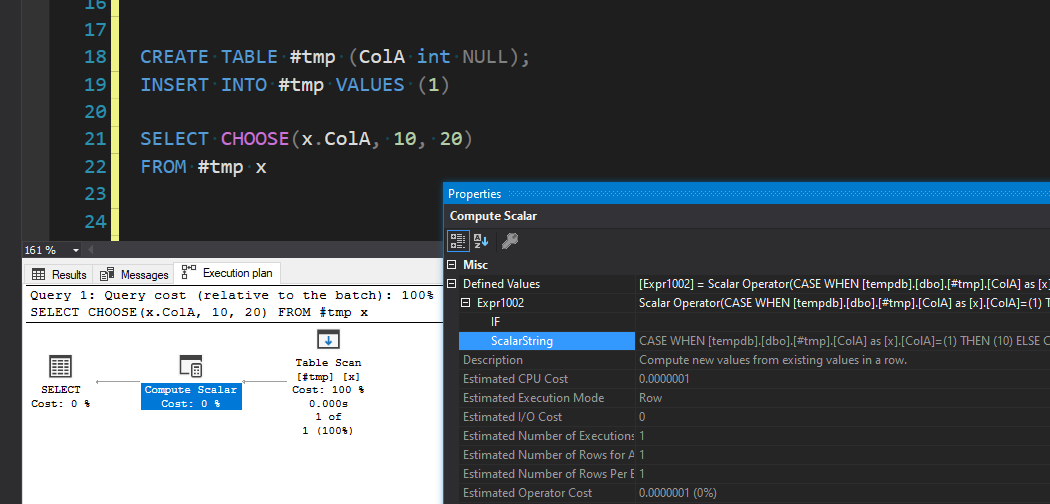
<p>Then take a look at the execution plan, and view the properties for the operator (there should only be one or two if it’s one of these test queries).</p>

<p><img src="/img/everythingcase/20240730_132524.png" alt="Screenshot of an execution plan in SQL Server Management Studio showing how the SQL function is converted into a CASE expression within the execution plan." /></p>

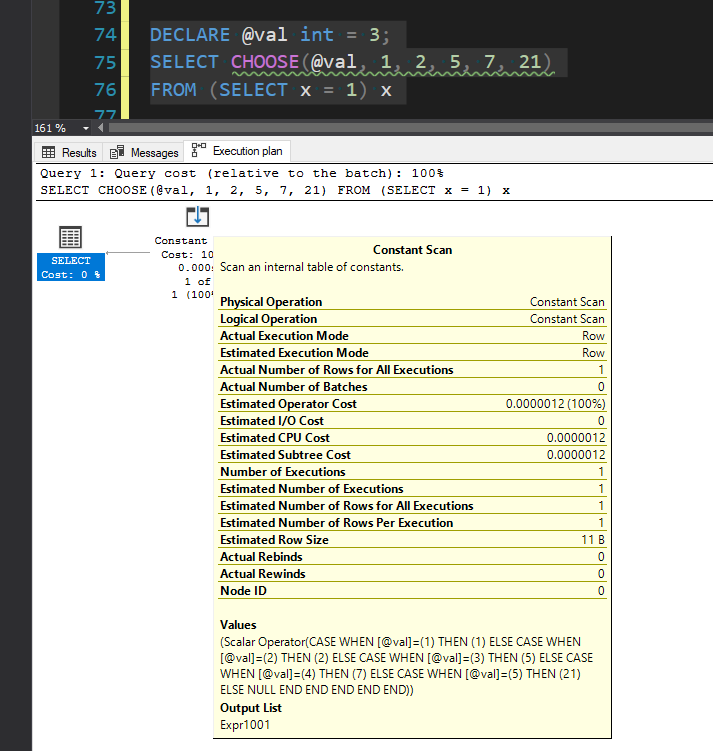
<p>This is the most consistent way to see it. I’ve found that depending on the query, you might also be able to see it in that query text preview under “Query 1:”, as well as in the operator stats pop-up, like this:</p>

<p><img src="/img/everythingcase/20240730_132733.png" alt="Screenshot of an execution plan in SQL Server Management Studio showing the operator stats popup which shows the CASE expression that the SQL function was converted into" /></p>]]></content><author><name>Chad Baldwin</name></author><category term="T-SQL" /><summary type="html"><![CDATA[A lot of people may not realize that some of our favorite T-SQL functions are really just a little syntactic sugar underneath.]]></summary><media:thumbnail xmlns:media="http://search.yahoo.com/mrss/" url="https://chadbaldwin.net/img/postbanners/2024-07-30-everythings-a-case-statement.png" /><media:content medium="image" url="https://chadbaldwin.net/img/postbanners/2024-07-30-everythings-a-case-statement.png" xmlns:media="http://search.yahoo.com/mrss/" /></entry><entry><title type="html">Fun with Unicode characters in SQL Queries</title><link href="https://chadbaldwin.net/2024/07/09/fun-with-unicode-in-sql-queries.html" rel="alternate" type="text/html" title="Fun with Unicode characters in SQL Queries" /><published>2024-07-09T14:00:00+00:00</published><updated>2024-07-09T14:00:00+00:00</updated><id>https://chadbaldwin.net/2024/07/09/fun-with-unicode-in-sql-queries</id><content type="html" xml:base="https://chadbaldwin.net/2024/07/09/fun-with-unicode-in-sql-queries.html"><![CDATA[<p>I never thought this would make for a good blog post, but here we are. Every single time I share a query that uses Unicode characters, someone <em>always</em> asks me what it is and why I’m using it. So now I have this blog post I can send to anyone who asks about it 😄.</p>

<p>I don’t want to get too far into the weeds explaining encodings, code points, etc. Mostly because you can just Google it, but also because it’s very confusing. Despite all the hours I’ve spent trying to learn about it, I still don’t get a lot of it. There’s also a lot of nuance regarding encodings when it comes to SQL Server, different collations, and different SQL versions. However, I did come across <a href="https://sqlrebel.org/2021/07/29/utf-16-and-utf-8-encoding-sql-server/" target="_blank">this blog post</a> that seems to break it down well.</p>

<p>For the purposes of this post, all you really need to know is Unicode is what allows applications to support non-english text (<code>データベース</code>), special symbols (<code>•</code>, <code>™</code>, <code>°</code>, <code>©</code>,<code>π</code>), diacritics (<code>smörgåsbord</code>, <code>jalapeño</code>, <code>résumé</code>), and much more. Unicode makes all this possible.</p>

<p>Unicode is HUGE, and there are a ton of characters that most people don’t even know exist. Sometimes I find myself scrolling through Unicode lookup sites just to see if I can find any cool/fun/useful characters I could use…A totally normal Saturday afternoon activity…👀</p>

<p>Out of all the random Unicode characters I’ve found…the one I use on a daily basis is <code>█</code>…that’s it, just a plain boring block. For the most part, this blog post will be about how this one boring character can help make your SQL queries a little easier to look at.</p>

<hr />

<h2 id="how-do-you-type-these">How do you type these!?</h2>

<p>Before anyone asks “how do you type these”…To be honest, I don’t, because I use SQL Prompt snippets where I’ve copy pasted my most used Unicode characters. I guess if you <em>really</em> want to type them yourself every time, you can use keyboard shortcuts. <a href="https://www.alt-codes.net/" target="_blank">Here’s a website I found</a> that has a list of common Unicode symbols and their “alt codes”. Where you hold alt and type the code. In the case of <code>█</code>, you would type <code>alt+219</code>.</p>

<p>‼ A very important note…if you are using ANY Unicode characters in a string literal in SQL Server, you have to make sure you prefix the string with <code>N</code>. Otherwise the Unicode characters won’t render, and you’ll just end up with blanks, question marks, etc. For example:</p>

<pre><code class="language-tsql">SELECT N'This is a Unicode string in SQL Server! 🦄'
SELECT 'This is NOT a Unicode string in SQL Server! 😭' -- Except when using UTF-8 collations in 2019+...read the blog post linked above
</code></pre>

<hr />

<h2 id="adding-a-column-set-separator">Adding a column set separator</h2>

<p>Have you ever written a query that joins a whole bunch of tables with a <code>SELECT *</code> at the top? …Of course you have, you’re a SQL developer. The problem is now you’re staring at a massive dataset 100 columns wide.</p>

<p>For example…</p>

<pre><code class="language-tsql">SELECT *
FROM sys.indexes i
    JOIN sys.objects o ON o.[object_id] = i.[object_id]
    JOIN sys.stats s ON s.[object_id] = i.[object_id] AND s.stats_id = i.index_id
    JOIN sys.partitions p ON p.[object_id] = i.[object_id] AND p.index_id = i.index_id
</code></pre>

<p>Just scrolling through all those columns, how do you know which columns are in which table? You could probably figure it out pretty quick if you know the data and have a good idea what the first column in each table is, but I’ve found that to be annoying. If you were working in Excel, would you add any special border formatting to make it a little easier to read? Because I would.</p>

<p>In the past, I would do something like this…</p>

<pre><code class="language-tsql">SELECT 'sys.indexes -&gt;'  , i.*
    , 'sys.objects -&gt;'   , o.*
    , 'sys.stats -&gt;'     , s.*
    , 'sys.partitions -&gt;', p.*
FROM ...
</code></pre>

<p><img src="/img/unicodequeries/20240708_155925.png" alt="Screenshot of SSMS data grid results using a column containing &quot;sys.stats -&gt;&quot; as a way to visually separate related columns" /></p>

<p>Don’t try to convince me that after staring at result grids all day that you’re going to easily and quickly spot that out of 100 columns.</p>

<p>Now, my typical pattern is to do something like this:</p>

<pre><code class="language-tsql">SELECT N'█ sys.indexes -&gt; █'   , i.*
    ,  N'█ sys.objects -&gt; █'   , o.*
    ,  N'█ sys.stats -&gt; █'     , s.*
    ,  N'█ sys.partitions -&gt; █', p.*
FROM ...
</code></pre>

<p><img src="/img/unicodequeries/20240708_160956.png" alt="Screenshot of SSMS data grid results using a column containing unicode block characters like &quot;█ sys.stats -&gt; █&quot; to visually separate related columns" /></p>

<p>I find that to be <em>significantly</em> easier to spot…Though, most times I really only do this…</p>

<pre><code class="language-tsql">SELECT N'█' [█], i.*
    ,  N'█' [█], o.*
    ,  N'█' [█], s.*
    ,  N'█' [█], p.*
FROM ...
</code></pre>

<p><img src="/img/unicodequeries/20240708_161344.png" alt="Screenshot of SSMS data grid results using a column containing only unicode block characters like &quot;█&quot; to visually separate related columns" /></p>

<p>Does it make the SELECT portion of the queries just a little bit ugly? Sure, but I’ve gotten used to it. And I feel the pros outweigh the cons.</p>

<hr />

<h2 id="adding-a-visual-row-identifier">Adding a visual row identifier</h2>

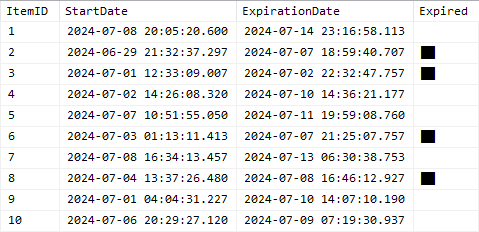
<p>My second most common usage for <code>█</code> is to easily spot specific rows I’m targeting while looking at a larger dataset. For example, I have a table of records with expiration dates, but I’m doing some data analysis, looking for patterns and I want to see the whole dataset, and not <em>just</em> those that are expired or vice versa.</p>

<p>Here’s a sample query/data generator:</p>

<pre><code class="language-tsql">SELECT TOP(100) x.ItemID, y.StartDate, z.ExpirationDate
    , Expired = IIF(z.ExpirationDate &lt;= GETDATE(), N'██', '')
FROM (VALUES(1),(2),(3),(4),(5),(6),(7),(8),(9),(10)) x(ItemID) -- If you're on SQL2022 try using GENERATE_SERIES(1,10) 😁
    CROSS APPLY (SELECT StartDate      = DATEADD(MILLISECOND,-FLOOR(RAND(CHECKSUM(NEWID()))*864000000), GETDATE())) y
    CROSS APPLY (SELECT ExpirationDate = DATEADD(MILLISECOND, FLOOR(RAND(CHECKSUM(NEWID()))*864000000), y.StartDate)) z
</code></pre>

<p>And here’s what that output might look like…</p>

<p><img src="/img/unicodequeries/20240708_164754.png" alt="Screenshot of SSMS data grid results using a column containing unicode block characters like &quot;█&quot; to visually identify target rows" /></p>

<p>Obviously, you don’t HAVE to use Unicode here, you’d probably be just as well off using <code>1</code> or <code>##</code> or whatever you want. I personally find that this makes it incredibly obvious and easy to spot.</p>

<hr />

<h2 id="creating-a-bar-chart">Creating a bar chart</h2>

<p>Now…this is more of a hack. By this point, if you’re creating bar charts with Unicode in SQL queries, you should probably be using some sort of reporting/GUI tool anyway. But it’s still fun.</p>

<p>I often find use in this because I can throw it into a simple utility script and then share that SQL script with others. It has the little bar graph graph in without them having to do anything special other than run it.</p>

<p>I won’t paste the whole script, but you can see where I’ve done this in a <a href="https://github.com/chadbaldwin/SQL/blob/main/Scripts/Drive%20Usage.sql" target="_blank">simple Drive Usage script here</a>.</p>

<p>The result of which looks like this:</p>

<p><img src="/img/unicodequeries/20240708_171010.png" alt="Screenshot of SSMS data grid results using unicode block characters like &quot;█&quot; and &quot;▒&quot; to build a bar chart for each record" /></p>

<p>Except here you’ll notice I’m actually using two different characters. <code>█</code> to represent used space, and <code>▒</code> (<code>alt+177</code>) to represent unused space.</p>

<p>Which boils down to these expressions:</p>

<pre><code class="language-tsql">DECLARE @barwidth int          = 50, -- Controls the overall width of the bar
        @pct      decimal(3,2) = 0.40; -- The percentage to render as a bar chart

-- Dark portion of the bar represents the percentage (ex. Percent used space)
SELECT REPLICATE(N'█', CONVERT(int,   FLOOR((    @pct) * @barwidth)))
     + REPLICATE(N'▒', CONVERT(int, CEILING((1 - @pct) * @barwidth)));

-- Light portion of the bar represents the percentage (ex. Percent free space)
SELECT REPLICATE(N'█', CONVERT(int,   FLOOR((1 - @pct) * @barwidth)))
     + REPLICATE(N'▒', CONVERT(int, CEILING((    @pct) * @barwidth)));
</code></pre>

<hr />

<h2 id="use-as-a-delimiter">Use as a delimiter</h2>

<p>I stole <a href="https://www.mssqltips.com/sqlservertip/4940/dealing-with-the-singlecharacter-delimiter-in-sql-servers-stringsplit-function/" target="_blank">this one from Aaron Bertrand</a>. The idea is to use a Unicode character that has a very unlikely chance of occurring in your data to use as a split point / delimiter.</p>

<p>The article I stole it from uses <code>nchar(9999)</code>, which is just this <code>✏</code>, a pencil, so that’s also what I happen to use now. You could pick from thousands of other characters as long as it’s not going to show up in your (hopefully clean) data.</p>

<p>For example, I’ll occasionally write something like this…</p>

<pre><code class="language-tsql">DECLARE @d nchar(1) = NCHAR(9999);

SELECT STRING_AGG(s.servicename, @d) WITHIN GROUP (ORDER BY s.servicename)
FROM sys.dm_server_services s
</code></pre>

<p>Which results in…</p>

<pre><code class="language-plaintext">SQL Full-text Filter Daemon Launcher (MSSQLSERVER)✏SQL Server (MSSQLSERVER)✏SQL Server Agent (MSSQLSERVER)
</code></pre>

<p>This isn’t necessarily a great option in all cases, you could also use something more appropriate like JSON or XML. But depending on what I’m working on, sometimes it’s nice to have something a bit lighter weight.</p>

<hr />

<h2 id="wrap-it-up">Wrap it up…</h2>

<p>This is really only scratching the surface of what Unicode has to offer and how you can use it in SQL. I recommend checking out various Unicode blocks (related sections of characters). Some good ones to check out would be <a href="https://unicode-explorer.com/b/2580" target="_blank">block elements</a> (what we’ve been using in this post), <a href="https://unicode-explorer.com/b/2500" target="_blank">box drawing</a>, <a href="https://unicode-explorer.com/b/2190" target="_blank">arrows</a> (there’s actually like 4 blocks just for arrows), <a href="https://unicode-explorer.com/b/1F0A0" target="_blank">playing cards</a>…just to name a few. You can view <a href="https://unicode-explorer.com/blocks" target="_blank">the full list here</a>.</p>

<p>I’ve also seen some pretty cool stuff for writing 3D text in SQL comments, using box drawing characters to visualize a parent-child hierarchy (kinda like when you run the windows <code>tree</code> command), etc.</p>

<p>Let me know what some of your favorite tricks are using Unicode characters.</p>]]></content><author><name>Chad Baldwin</name></author><category term="T-SQL" /><summary type="html"><![CDATA[Unicode characters are a fun and useful way to help make your query results easier to read and even make some fun graphics.]]></summary><media:thumbnail xmlns:media="http://search.yahoo.com/mrss/" url="https://chadbaldwin.net/img/postbanners/2024-07-09-fun-with-unicode-in-sql-queries.png" /><media:content medium="image" url="https://chadbaldwin.net/img/postbanners/2024-07-09-fun-with-unicode-in-sql-queries.png" xmlns:media="http://search.yahoo.com/mrss/" /></entry><entry><title type="html">What’s new in SQL Server 2022</title><link href="https://chadbaldwin.net/2022/06/02/whats-new-in-sql-server-2022.html" rel="alternate" type="text/html" title="What’s new in SQL Server 2022" /><published>2022-06-02T19:30:00+00:00</published><updated>2022-06-02T19:30:00+00:00</updated><id>https://chadbaldwin.net/2022/06/02/whats-new-in-sql-server-2022</id><content type="html" xml:base="https://chadbaldwin.net/2022/06/02/whats-new-in-sql-server-2022.html"><![CDATA[<style> .hljs { max-height: 1000px; } </style>

<blockquote>
  <p>Note: It seems since this post was written, some functions have been added, or some syntax has changed. So until I have time to update this post with the latest information, keep that in mind.</p>
</blockquote>

<p>I’ve been excited to play with the new features and language enhancements in SQL Server 2022 so I’ve been keeping an eye on the Microsoft Docker repository for the 2022 image. Well they finally added it! I immediately pulled the image and started playing with it.</p>

<p>I want to focus on the language enhancements as those are the easiest to demonstrate, and I feel that’s what you’ll be able to take advantage of the quickest after upgrading.</p>

<p><a href="https://docs.microsoft.com/en-us/sql/sql-server/what-s-new-in-sql-server-2022" target="_blank">Here’s the official post from Microsoft.</a></p>

<hr />

<p>Table of contents:</p>

<ul id="markdown-toc">
  <li><a href="#docker-tag" id="markdown-toc-docker-tag">Docker Tag</a></li>
  <li><a href="#generate_series" id="markdown-toc-generate_series">GENERATE_SERIES()</a></li>
  <li><a href="#greatest-and-least" id="markdown-toc-greatest-and-least">GREATEST() and LEAST()</a></li>
  <li><a href="#string_split" id="markdown-toc-string_split">STRING_SPLIT()</a></li>
  <li><a href="#date_bucket" id="markdown-toc-date_bucket">DATE_BUCKET()</a></li>
  <li><a href="#first_value-and-last_value" id="markdown-toc-first_value-and-last_value">FIRST_VALUE() and LAST_VALUE()</a></li>
  <li><a href="#window-clause" id="markdown-toc-window-clause">WINDOW clause</a></li>
  <li><a href="#json-functions" id="markdown-toc-json-functions">JSON functions</a>    <ul>
      <li><a href="#isjson" id="markdown-toc-isjson">ISJSON()</a></li>
      <li><a href="#json_path_exists" id="markdown-toc-json_path_exists">JSON_PATH_EXISTS()</a></li>
      <li><a href="#json_object" id="markdown-toc-json_object">JSON_OBJECT()</a></li>
      <li><a href="#json_array" id="markdown-toc-json_array">JSON_ARRAY()</a></li>
    </ul>
  </li>
  <li><a href="#wrapping-up" id="markdown-toc-wrapping-up">Wrapping up</a></li>
</ul>

<hr />

<h2 id="docker-tag">Docker Tag</h2>

<p>I won’t go into the details of how to set up or use Docker, but you should definitely set aside some time to learn it. You can copy paste the command supplied by Microsoft <a href="https://hub.docker.com/_/microsoft-mssql-server" target="_blank">on their Docker Hub page for SQL Server</a>, but this is the one I prefer to use:</p>

<pre><code class="language-powershell">docker run -it `
    --name sqlserver `
    -e ACCEPT_EULA='Y' `
    -e MSSQL_SA_PASSWORD='yourStrong(!)Password' `
    -e MSSQL_AGENT_ENABLED='True' `
    -p 1433:1433 `
    mcr.microsoft.com/mssql/server:2022-latest;
</code></pre>

<p>This sets it up to always use the same name of “sqlserver” for the container, this keeps you from creating multiple SQL server containers. It keeps it in interactive mode so you can watch for system errors, and it starts it up with SQL Agent running. Also, this will automatically download and run the SQL Server image if you don’t already have it.</p>

<p>You won’t need to worry about loading up any specific databases for this blog post, but if that’s something you’d like to learn how to do, <a href="/2021/11/04/restore-database-in-docker.html" target="_blank">I’ve blogged about it here</a>.</p>

<hr />

<h2 id="generate_series">GENERATE_SERIES()</h2>

<p><a href="https://docs.microsoft.com/en-us/sql/t-sql/functions/generate-series-transact-sql" target="_blank">Microsoft Documentation</a></p>

<p>I want to cover this function first so we can use it to help us with building sample data for the rest of this post.</p>

<p>Generating a series of incrementing (or decrementing) values is extremely useful. If you’ve never used a “tally table” or a “numbers table” plenty of other SQL bloggers have covered it and I highly recommend looking up their posts.</p>

<p>A few uses for tally tables:</p>

<ul>
  <li>
    <p>Can often be the solution that avoids reverting to what Jeff Moden likes to call “RBAR”…Row-By-Agonizing-Row. Tally tables can help you perform iterative / incremental tasks without having to build any looping mechanisms. In fact, one of the fastest solutions for splitting strings (prior to <code>STRING_SPLIT()</code>) is using a tally table. Up until recently (we’ll cover that later), that tally table string split function was still one of the best methods even despite <code>STRING_SPLIT()</code> being available.</p>
  </li>
  <li>
    <p>Can help you with reporting, such as building a list of dates so that you don’t have gaps in your aggregated report that is grouped by day or month. If you group sales by month, but a particular month had no sales you can use the tally table to fill the gaps with “0” sales.</p>
  </li>
  <li>
    <p>They’re great for helping you generate sample data as you’ll see throughout this post.</p>
  </li>
</ul>

<p>Prior to this new function, the best way I’ve seen to generate a tally table is using the CTE method, like so:</p>

<pre><code class="language-tsql">WITH c1 AS (SELECT x.x FROM (VALUES(1),(1),(1),(1),(1),(1),(1),(1),(1),(1)) x(x))  -- 10
    , c2(x) AS (SELECT 1 FROM c1 x CROSS JOIN c1 y)                                -- 10 * 10
    , c3(x) AS (SELECT 1 FROM c2 x CROSS JOIN c2 y CROSS JOIN c2 z)                -- 100 * 100 * 100
    , c4(rn) AS (SELECT 0 UNION SELECT ROW_NUMBER() OVER (ORDER BY (SELECT 1)) FROM c3)  -- Add zero record, and row numbers
SELECT TOP(1000) x.rn
FROM c4 x
ORDER BY x.rn;
</code></pre>

<p>This will generate rows with values from 0 to 1,000,000. In this sample, it is using a <code>TOP(1000)</code> and an <code>ORDER BY</code> to only return the first 1,000 rows (0 - 999). It can be easily modified to generate more or less rows or ranges of rows and it’s extremely fast.</p>

<p>Another method I personally figured out while trying to work on a code golf problem was using XML:</p>

<pre><code class="language-tsql">DECLARE @x xml = REPLICATE(CONVERT(varchar(MAX),'&lt;n/&gt;'), 999); --Table size
WITH c(rn) AS (
    SELECT 0 
    UNION ALL
    SELECT ROW_NUMBER() OVER (ORDER BY (SELECT 1))
    FROM @x.nodes('n') x(n)
)
SELECT c.rn
FROM c;
</code></pre>

<p>This method is more for fun, and I typically wouldn’t use this in a production environment. I’m sure it’s plenty stable, I just prefer the CTE method more. This method also returns 1000 records (0 - 999).</p>

<p>Now, in comes the <code>GENERATE_SERIES()</code> function. You specify where it starts, where it ends and what to increment by (optional). Though, this is certainly not a direct drop in replacement for the options above and I’ll show you why.</p>

<pre><code class="language-tsql">SELECT [value]
FROM GENERATE_SERIES(START = 0, STOP = 999, STEP = 1);
</code></pre>

<p>This is pretty awesome, and it definitely beats typing all that other junk from the other options and it’s a lot more straight forward and intuitive to read.</p>

<p>I think it’s great that you can customize it to increment, decrement, change the range and even change the datatype by supplying decimal values. You can also set the “STEP” size (i.e. only return every N values). I could see this coming in handy for generating date tables. For example, generate a list of dates going back every 30 days or every 14 days.</p>

<pre><code class="language-tsql">-- List of dates going back every 30 days for 180 days
SELECT DateValue = CONVERT(date, DATEADD(DAY, [value], '2022-06-01'))
FROM GENERATE_SERIES(START = -30, STOP = -180, STEP = -30);

/* Result:
| DateValue  |
|------------|
| 2022-05-02 |
| 2022-04-02 |
| 2022-03-03 |
| 2022-02-01 |
| 2022-01-02 |
| 2021-12-03 |
*/
</code></pre>

<p>You could certainly do this with the CTE method, it just wouldn’t be as obvious as this.</p>

<p>However, I quickly discovered one major caveat…performance. This <code>GENERATE_SERIES()</code> function is an absolute pig 🐷. I don’t know why it’s so slow, maybe they’re still working out the kinks, or maybe it will improve in a future update.</p>

<p>Here’s how it stacks up on my local machine in docker.</p>

<p>Generating 1,000,001 rows from 0 to 1,000,000:</p>

<table>
  <thead>
    <tr>
      <th>Method</th>
      <th>CPU Time (ms)</th>
      <th>Elapsed Time (ms)</th>
    </tr>
  </thead>
  <tbody>
    <tr>
      <td>CTE</td>
      <td>1,361</td>
      <td>500</td>
    </tr>
    <tr>
      <td>XML</td>
      <td>775</td>
      <td>784</td>
    </tr>
    <tr>
      <td><code>GENERATE_SERIES()</code></td>
      <td>47,801</td>
      <td>44,371</td>
    </tr>
  </tbody>
</table>

<p>Unless there’s something wrong with my docker image…this doesn’t seem ready for prime time. I could see this being used in utility scripts, sample scripts (like this blog post), reporting procs, etc. Where you only need to generate a small set of records, but if you need to generate a large set of records often, it seems you’re best sticking with the CTE method for now.</p>

<p>I could possibly see this being useful when used inline where you need to generate a different number of records for each row (e.g. in an <code>APPLY</code> operator). However, even then, seeing how slow this is, you might be better off building your own TVF using the CTE method 🤷‍♂️. So while it may be shorter and much easier to use, I’m not sure if the performance trade-off is worth it. Hopefully it’s just my machine?</p>

<p>Now that we’ve got this one out of the way, we can use it to help us with generating sample data for the rest of this post.</p>

<hr />

<h2 id="greatest-and-least">GREATEST() and LEAST()</h2>

<p>Microsoft Documentation:</p>

<ul>
  <li><a href="https://docs.microsoft.com/en-us/sql/t-sql/functions/logical-functions-greatest-transact-sql" target="_blank">GREATEST</a></li>
  <li><a href="https://docs.microsoft.com/en-us/sql/t-sql/functions/logical-functions-least-transact-sql" target="_blank">LEAST</a></li>
</ul>

<p>These are not exactly new. They have made their way around the blogging community for a while after they were discovered as undocumented functions in Azure SQL Database, but they’re still worth demonstrating since they are part of the official 2022 release changes.</p>

<p>I’m sure all of you know how to use <code>MIN()</code> and <code>MAX()</code>. These are aggregate functions that run against a grouping, or a window. Their usage is fairly straight forward. If you want to find the highest or lowest value for a single column in a <code>GROUP BY</code> or a window function, you would use one of those.</p>

<p>But what if you want to get the highest or lowest value from multiple columns <em>within</em> a row? For example, maybe you have <code>LastModifiedDate</code>, <code>LastAccessDate</code> and <code>LastErrorDate</code> columns and you want the most recent date in order to determine the last interaction with that item?</p>

<p>Previously, you’d need to use a case statement or a table value constructor.</p>

<p>It would look something like this:</p>

<pre><code class="language-tsql">-- Generate sample data

DROP TABLE IF EXISTS #event;
CREATE TABLE #event (
    ID                  int     NOT NULL IDENTITY(1,1),
    LastModifiedDate    datetime    NULL,
    LastAccessDate      datetime    NULL,
    LastErrorDate       datetime    NULL,
);

INSERT INTO #event (LastModifiedDate, LastAccessDate, LastErrorDate)
SELECT DATEADD(SECOND, -(RAND(CHECKSUM(NEWID())) * 200000000), GETDATE())
    ,  DATEADD(SECOND, -(RAND(CHECKSUM(NEWID())) * 200000000), GETDATE())
    ,  DATEADD(SECOND, -(RAND(CHECKSUM(NEWID())) * 200000000), GETDATE())
FROM GENERATE_SERIES(START = 1, STOP = 5); -- See...nifty, right?
</code></pre>

<pre><code class="language-tsql">-- Old method using table value constructor
SELECT LastModifiedDate, LastAccessDate, LastErrorDate
    , y.[Greatest], y.[Least]
FROM #event
    CROSS APPLY (
        SELECT [Least] = MIN(x.val), [Greatest] = MAX(x.val)
        FROM (VALUES (LastModifiedDate), (LastAccessDate), (LastErrorDate)) x(val)
    ) y;

-- New method using LEAST/GREATEST functions
SELECT LastModifiedDate, LastAccessDate, LastErrorDate
    , [Greatest] = GREATEST(LastModifiedDate, LastAccessDate, LastErrorDate)
    , [Least]    = LEAST(LastModifiedDate, LastAccessDate, LastErrorDate)
FROM #event;
</code></pre>

<p>Result:</p>

<p><img src="/img/sqlserver2022/20220601_181117.png" alt="Result set showing the usage of greatest and least functions" /></p>

<p>Of course this also comes with a caveat. These new functions are great if all you want to do is find the highest or lowest value…but if you want to use any other aggregate function, like <code>AVG()</code> or <code>SUM()</code>…unfortunately you’d still need to use the old method.</p>

<hr />

<h2 id="string_split">STRING_SPLIT()</h2>

<p><a href="https://docs.microsoft.com/en-us/sql/t-sql/functions/string-split-transact-sql" target="_blank">Microsoft Documentation</a></p>

<p>This is also not a new function, however, after (I’m sure) many requests…it has been enhanced. Most people probably don’t know, or maybe just haven’t bothered to care, but up until now, you should never rely on the order that <code>STRING_SPLIT()</code> returns its results. They are not considered to be returned in any particular order, and that is still the case.</p>

<p>However, they have now added an additional “ordinal” column that you can turn on using an optional setting.</p>

<p>Before, you would often seen people use <code>STRING_SPLIT()</code> like this:</p>

<pre><code class="language-tsql">SELECT [value], ordinal
FROM (
    SELECT [value]
        , ordinal = ROW_NUMBER() OVER (ORDER BY (SELECT NULL))
    FROM STRING_SPLIT('one fish,two fish,red fish,blue fish', ',')
) x;

/* Result:
| value     | ordinal |
|-----------|---------|
| one fish  | 1       |
| two fish  | 2       |
| red fish  | 3       |
| blue fish | 4       |
*/
</code></pre>

<p>And while you more than likely will get the right numbers associated with the correct position of the item…you really shouldn’t do this because it’s undocumented behavior. At any time, Microsoft could change how this function works internally, and now all of a sudden that production code you wrote relying on its order is messing up.</p>

<p>But now you can enable an “ordinal” column to be included in the output. The value of the column indicates the order in which the item occurs in the string.</p>

<pre><code class="language-tsql">SELECT [value], ordinal
FROM STRING_SPLIT('one fish,two fish,red fish,blue fish', ',', 1);

/* Result:
| value     | ordinal |
|-----------|---------|
| one fish  | 1       |
| two fish  | 2       |
| red fish  | 3       |
| blue fish | 4       |
*/
</code></pre>

<hr />

<h2 id="date_bucket">DATE_BUCKET()</h2>

<p><a href="https://docs.microsoft.com/en-us/sql/t-sql/functions/date-bucket-transact-sql" target="_blank">Microsoft Documentation</a></p>

<p>Now this is a cool new function that I’m looking forward to testing out. It’s able to give you the beginning of a date range based on the interval you provide it. For example “what’s the first day of the month for this date”.</p>

<p>Simple usage:</p>

<pre><code class="language-tsql">DECLARE @date datetime = GETDATE();
SELECT Interval, [Value]
FROM (VALUES
      ('Source' , @date)
    , ('SECOND' , DATE_BUCKET(SECOND , 1, @date))
    , ('MINUTE' , DATE_BUCKET(MINUTE , 1, @date))
    , ('HOUR'   , DATE_BUCKET(HOUR   , 1, @date))
    , ('DAY'    , DATE_BUCKET(DAY    , 1, @date))
    , ('WEEK'   , DATE_BUCKET(WEEK   , 1, @date))
    , ('MONTH'  , DATE_BUCKET(MONTH  , 1, @date))
    , ('QUARTER', DATE_BUCKET(QUARTER, 1, @date))
    , ('YEAR'   , DATE_BUCKET(YEAR   , 1, @date))
) x(Interval, [Value]);

/* Result:
| Interval | Value                   |
|----------|-------------------------|
| Source   | 2022-06-02 13:30:48.353 |
| SECOND   | 2022-06-02 13:30:48.000 |
| MINUTE   | 2022-06-02 13:30:00.000 |
| HOUR     | 2022-06-02 13:00:00.000 |
| DAY      | 2022-06-02 00:00:00.000 |
| WEEK     | 2022-05-30 00:00:00.000 |
| MONTH    | 2022-06-01 00:00:00.000 |
| QUARTER  | 2022-04-01 00:00:00.000 |
| YEAR     | 2022-01-01 00:00:00.000 |
*/
</code></pre>

<p>See how each interval is being rounded down to the nearest occurrence? This is super useful for things like grouping data by month. For example, “group sales by month using purchase date”. Prior to this you’d have to use methods like the following:</p>

<pre><code class="language-tsql">SELECT DATEPART(MONTH, PurchaseDate), DATEPART(YEAR, PurchaseDate)
FROM dbo.Sale
GROUP BY DATEPART(MONTH, PurchaseDate), DATEPART(YEAR, PurchaseDate);

--OR

SELECT MONTH(PurchaseDate), YEAR(PurchaseDate)
FROM dbo.Sale
GROUP BY MONTH(PurchaseDate), YEAR(PurchaseDate);
</code></pre>

<p>Those work, but they’re ugly, because now you have a column for month and a column for year. So then you might use something like:</p>

<pre><code class="language-tsql">SELECT DATEFROMPARTS(YEAR(PurchaseDate), MONTH(PurchaseDate), 1)
FROM dbo.Sale
GROUP BY DATEFROMPARTS(YEAR(PurchaseDate), MONTH(PurchaseDate), 1);

--OR

SELECT DATEADD(MONTH, DATEDIFF(MONTH, 0, GETDATE()), 0)
FROM dbo.Sale
GROUP BY DATEADD(MONTH, DATEDIFF(MONTH, 0, GETDATE()), 0);
</code></pre>

<p>These methods work too…but they’re both a bit ugly, especially that second method. But that second method comes in handy when you need to use other intervals, like <code>WEEK</code> or <code>QUARTER</code> because then the <code>DATEFROMPARTS()</code> method doesn’t work.</p>

<p>So rather than using all those old methods, now you can use:</p>

<pre><code class="language-tsql">SELECT DATE_BUCKET(MONTH, 1, PurchaseDate)
FROM dbo.Sale
GROUP BY DATE_BUCKET(MONTH, 1, PurchaseDate);
</code></pre>

<p>Easy as that. Easier to read, easier to know what it’s doing.</p>

<p>It also allows you to specify a “bucket width”. To put it in plain terms, it allows you to round down to the nearest increment of time. For example, you could use it to round down to the nearest interval of 5 minutes. So <code>06:33:34</code> rounds down to <code>06:30:00</code>. This is great for reporting. You can break data up into chunks, for example, maybe you want to break the day up into 8 hour shifts.</p>

<pre><code class="language-tsql">DROP TABLE IF EXISTS #log;
CREATE TABLE #log (
    InsertDate datetime NULL,
);

-- Generate 1000 events with random times spread out across a single day
INSERT INTO #log (InsertDate)
SELECT DATEADD(SECOND, -(RAND(CHECKSUM(NEWID())) * 86400), '2022-06-02')
FROM GENERATE_SERIES(START = 1, STOP = 1000); -- I told you this would be useful

SELECT TOP(5) InsertDate FROM #log;
/*
| InsertDate              |
|-------------------------|
| 2022-06-01 19:22:54.000 |
| 2022-06-01 08:01:13.000 |
| 2022-06-01 09:35:48.000 |
| 2022-06-01 22:28:38.000 |
| 2022-06-01 05:26:08.000 |
*/
</code></pre>

<p>In this example, I’ve generate 1,000 random events to simulate a log table. Prior to using <code>DATE_BUCKET()</code> how would you have broken this up into 8 hour chunks? Here’s how I would have done it:</p>

<pre><code class="language-tsql">SELECT DATEADD(HOUR, (DATEDIFF(HOUR, 0, InsertDate) / 8) * 8, 0)
    , Total = COUNT(*)
FROM #log
GROUP BY DATEADD(HOUR, (DATEDIFF(HOUR, 0, InsertDate) / 8) * 8, 0);
</code></pre>

<p>All this is doing is getting the number of hours since <code>1900-01-01</code> (<code>0</code>), then dividing by 8. Since I’m dividing an int by an int, it automatically floors the result. So <code>10 / 8 = 1</code>, <code>15 / 8 = 1</code>, <code>16 / 8 = 2</code>, otherwise you would need to explicitly use <code>FLOOR()</code>. Then it is re-adding those hours back to 0 to get the datetime rounded to the nearest increment of 8 hours. Fortunately, increments of 2, 3, 4, 6, 8 and 12 all work nicely with this method.</p>

<p>However, <code>DATE_BUCKET()</code> makes this a lot easier:</p>

<pre><code class="language-tsql">SELECT Bucket = DATE_BUCKET(HOUR, 8, InsertDate)
    , Total = COUNT(*)
FROM #log
GROUP BY DATE_BUCKET(HOUR, 8, InsertDate);

/* Result:
| Bucket                  | Total |
|-------------------------|-------|
| 2022-06-01 00:00:00.000 | 378   |
| 2022-06-01 08:00:00.000 | 303   |
| 2022-06-01 16:00:00.000 | 319   |
*/
</code></pre>

<hr />

<h2 id="first_value-and-last_value">FIRST_VALUE() and LAST_VALUE()</h2>

<p>Microsoft Documentation:</p>

<ul>
  <li><a href="https://docs.microsoft.com/en-us/sql/t-sql/functions/first-value-transact-sql" target="_blank">FIRST_VALUE</a></li>
  <li><a href="https://docs.microsoft.com/en-us/sql/t-sql/functions/last-value-transact-sql" target="_blank">LAST_VALUE</a></li>
</ul>

<p>Similar to <code>SPLIT_STRING()</code>, neither of these are new, but they have been greatly enhanced. After years of waiting, we finally have the ability to control how <code>NULL</code> values are handled with the use of <code>IGNORE NULLS</code> and <code>RESPECT NULLS</code>.</p>

<p>In SQL Server, <code>NULL</code> values are always sorted to the “lowest” end. So if you sort ascending, <code>NULL</code> values will be at the top. Unfortunately, we don’t have a choice over that matter. In other RDBMSs such as Postgres, you can control this behavior (e.g. <code>ORDER BY MyValue ASC NULLS LAST</code>).</p>

<p>I’ve personally never run into this as a major problem, there’s always ways around it, such as <code>ORDER BY IIF(MyValue IS NULL, 0, 1), MyValue</code>, which will sort <code>NULL</code> values to the bottom first, <em>then</em> sort by <code>MyValue</code>.</p>

<p>In a similar way, you can run into issues with this when using <code>FIRST_VALUE()</code> or <code>LAST_VALUE()</code> and the data contains <code>NULL</code> values. It’s not <em>exactly</em> the same issue, but it goes along the same lines as having control over how <code>NULL</code> values are treated.</p>

<p>I <em>was</em> going to build a example for this, but then I ran across this article from Microsoft, which uses the exact example I was going to build, and it perfectly explains and demonstrates how you can use this new feature to fill in missing data using <code>IGNORE NULLS</code>:</p>

<p><a href="https://docs.microsoft.com/en-us/azure/azure-sql-edge/imputing-missing-values" target="_blank">https://docs.microsoft.com/en-us/azure/azure-sql-edge/imputing-missing-values</a></p>

<hr />

<h2 id="window-clause">WINDOW clause</h2>

<p><a href="https://docs.microsoft.com/en-us/sql/t-sql/queries/select-window-transact-sql" target="_blank">Microsoft Documentation</a></p>

<p>I’m honestly very surprised that this was included, but I’m glad it was. If you’re familiar with using window functions, then you are going to love this.</p>

<p>Let’s use a very simple example. I’m going to use <code>GENERATE_SERIES()</code> to get a list of values 1 - 10. Now I want to perform some window operations on those values, partitioning them by odd vs even. So for both odd and even numbers, I want to see a row number, a running total (sum), a running count, and a running average.</p>

<pre><code class="language-tsql">SELECT [value]
    , RowNum = ROW_NUMBER() OVER (PARTITION BY [value] % 2 ORDER BY [value])
    , RunSum = SUM([value]) OVER (PARTITION BY [value] % 2 ORDER BY [value])
    , RunCnt = COUNT(*)     OVER (PARTITION BY [value] % 2 ORDER BY [value])
    , RunAvg = AVG([value]) OVER (PARTITION BY [value] % 2 ORDER BY [value])
FROM GENERATE_SERIES(START = 1, STOP = 10)
ORDER BY [value];

/* Result:
| value | RowNum | RunSum | RunCnt | RunAvg |
|-------|--------|--------|--------|--------|
| 1     | 1      | 1      | 1      | 1      |
| 2     | 1      | 2      | 1      | 2      |
| 3     | 2      | 4      | 2      | 2      |
| 4     | 2      | 6      | 2      | 3      |
| 5     | 3      | 9      | 3      | 3      |
| 6     | 3      | 12     | 3      | 4      |
| 7     | 4      | 16     | 4      | 4      |
| 8     | 4      | 20     | 4      | 5      |
| 9     | 5      | 25     | 5      | 5      |
| 10    | 5      | 30     | 5      | 6      |
*/
</code></pre>

<p>The problem here is we’re repeating a lot of code…<code>OVER (PARTITION BY [value] % 2 ORDER BY [value])</code> is repeated four times. That’s a bit wasteful, and open to error. All it takes is for that window to change and a developer accidentally forgets to update one of them.</p>

<p>That’s where the new <code>WINDOW</code> clause comes in. Instead, you can define your window with a name/alias and then reuse it. So it is only defined once.</p>

<pre><code class="language-tsql">SELECT [value]
    , RowNum = ROW_NUMBER() OVER win
    , RunSum = SUM([value]) OVER win
    , RunCnt = COUNT(*)     OVER win
    , RunAvg = AVG([value]) OVER win
FROM GENERATE_SERIES(START = 1, STOP = 10)
WINDOW win AS (PARTITION BY [value] % 2 ORDER BY [value])
ORDER BY [value];
</code></pre>

<p>I love how simple this is. Now our window is defined only once. Any future changes only need to alter a single line. I’m looking forward to using this one.</p>

<hr />

<h2 id="json-functions">JSON functions</h2>

<p>I saved this section for last on purpose because I have almost no experience working with JSON so I likely won’t have great real-world examples, but I can at least walk through the usage of these functions.</p>

<p>Microsoft has great examples in their documentation already, so this walk-through is more for me than you because it’s forcing me to learn how to use these functions.</p>

<p>Microsoft Documentation:</p>

<ul>
  <li><a href="https://docs.microsoft.com/en-us/sql/t-sql/functions/isjson-transact-sql" target="_blank">ISJSON</a></li>
  <li><a href="https://docs.microsoft.com/en-us/sql/t-sql/functions/json-path-exists-transact-sql" target="_blank">JSON_PATH_EXISTS</a></li>
  <li><a href="https://docs.microsoft.com/en-us/sql/t-sql/functions/json-object-transact-sql" target="_blank">JSON_OBJECT</a></li>
  <li><a href="https://docs.microsoft.com/en-us/sql/t-sql/functions/json-array-transact-sql" target="_blank">JSON_ARRAY</a></li>
</ul>

<h3 id="isjson">ISJSON()</h3>

<p>The <code>ISJSON()</code> function is not new (thank you to the reddit user that pointed this out to me), but it was enhanced. There is now a <code>json_type_constraint</code> parameter.</p>

<p>Without the new parameter, this one is about as simple as it gets…It checks whether the value you pass is valid JSON or not.</p>

<pre><code class="language-tsql">SELECT ISJSON('{ "name":"Chad" }'); -- Returns 1 because it is valid JSON
SELECT ISJSON('{ name:"Chad" }');   -- Returns 0 because it is invalid JSON
</code></pre>

<p>However, the new parameter allows you to do a little more than just check whether the blob you pass to it is valid or not. Now you can check if its type is valid as well. Maybe you’re generating JSON and you want to test the individual parts rather than testing the entire blob at the end of your task.</p>

<p>Here are some test cases:</p>

<pre><code class="language-tsql">SELECT *
FROM (VALUES  ('string','"testing"'), ('empty string','""'), ('bad string','asdf')
            , ('scalar','1234')
            , ('boolean','true'), ('bad boolean', 'TRUE')
            , ('array','[1,2,{"foo":"bar"}]'), ('empty array', '[]')
            , ('object','{"name":"chad"}'), ('empty object','{}')
            , ('null literal','null')
            , ('blank value', '')
            , ('NULL value', NULL)
) x([type], [value])
    CROSS APPLY (
        -- Case statements to make visualization of results easier
        SELECT [VALUE]  = CASE ISJSON(x.[value], VALUE)  WHEN 1 THEN 'True' WHEN 0 THEN '' ELSE NULL END
            ,  [SCALAR] = CASE ISJSON(x.[value], SCALAR) WHEN 1 THEN 'True' WHEN 0 THEN '' ELSE NULL END
            ,  [ARRAY]  = CASE ISJSON(x.[value], ARRAY)  WHEN 1 THEN 'True' WHEN 0 THEN '' ELSE NULL END
            ,  [OBJECT] = CASE ISJSON(x.[value], OBJECT) WHEN 1 THEN 'True' WHEN 0 THEN '' ELSE NULL END
    ) y

/* Result:
| type         | value               | VALUE | SCALAR | ARRAY | OBJECT | 
|--------------|---------------------|-------|--------|-------|--------| 
| string       | "testing"           | True  | True   |       |        | 
| empty string | ""                  | True  | True   |       |        | 
| bad string   | asdf                |       |        |       |        | 
| scalar       | 1234                | True  | True   |       |        | 
| boolean      | true                | True  |        |       |        | 
| bad boolean  | TRUE                |       |        |       |        | 
| array        | [1,2,{"foo":"bar"}] | True  |        | True  |        | 
| empty array  | []                  | True  |        | True  |        | 
| object       | {"name":"chad"}     | True  |        |       | True   | 
| empty object | {}                  | True  |        |       | True   | 
| null literal | null                | True  |        |       |        | 
| blank value  |                     |       |        |       |        | 
| NULL value   | NULL                | NULL  | NULL   | NULL  | NULL   | 
*/
</code></pre>

<p>Based on these results you can see that <code>VALUE</code> is a generic check, determining whether the value is valid regardless of type. Whereas <code>SCALAR</code>, <code>ARRAY</code> and <code>OBJECT</code> are more granular and check for specific types.</p>

<h3 id="json_path_exists">JSON_PATH_EXISTS()</h3>

<p>Checks to see whether the path you specify exists in the provided JSON blob.</p>

<pre><code class="language-tsql">DECLARE @jsonblob nvarchar(MAX) = N'
{
    "name":"Chad Baldwin",
    "addresses":[
        {"type":"billing", "street":"123 Main Street", "city":"New York", "state":"NY", "zip":"01234"},
        {"type":"shipping", "street":"2073 Beech Street", "city":"Pleasanton", "state":"CA", "zip":"94566"}
    ]
}';

SELECT ISJSON(@jsonblob); -- returns 1 because it is valid JSON
SELECT JSON_PATH_EXISTS(@jsonblob, '$.addresses[0].zip'); -- returns 1 because the path exists
</code></pre>

<p>Explanation of <code>$.addresses[0].zip</code>:</p>

<ul>
  <li><code>$</code> - represents the root of the blob</li>
  <li><code>addresses[0]</code> - returns the first object within the <code>addresses</code> array.</li>
  <li><code>zip</code> - looks for a property named <code>zip</code> within that object</li>
</ul>

<h3 id="json_object">JSON_OBJECT()</h3>

<p>This is an interesting one, the syntax is a bit odd, but you’re basically passing the function key:value pairs, which it then uses to build a simple JSON string.</p>

<pre><code class="language-tsql">SELECT item = x.y, jsonstring = JSON_OBJECT('item':x.y)
FROM (VALUES ('one fish'),('two fish'),('red fish'),('blue fish')) x(y);

/* Result:
| item      | jsonstring           | 
|-----------|----------------------| 
| one fish  | {"item":"one fish"}  | 
| two fish  | {"item":"two fish"}  | 
| red fish  | {"item":"red fish"}  | 
| blue fish | {"item":"blue fish"} | 
*/
</code></pre>

<p>So it allows you to generate a JSON object for a set of values/columns on a per row basis.</p>

<h3 id="json_array">JSON_ARRAY()</h3>

<p>This is similar as <code>JSON_OBJECT()</code> in regard to generating JSON from data, except instead of creating an object with various properties, it’s creating an array of values or objects.</p>

<pre><code class="language-tsql">SELECT JSON_ARRAY('one fish','two fish','red fish','blue fish');

/* Result:
["one fish","two fish","red fish","blue fish"]
*/
</code></pre>

<p>From there you can combine <code>JSON_OBJECT</code> and <code>JSON_ARRAY</code> to generate nested JSON blobs from your data.</p>

<hr />

<h2 id="wrapping-up">Wrapping up</h2>

<p>This ended up being <em>much</em> longer than I had originally anticipated, but I’m glad I went through it as it helped me gain a much better understanding of all these changes, new functions, enhancements, and how to use them in real world situations.</p>

<p>Thanks for reading!</p>]]></content><author><name>Chad Baldwin</name></author><category term="T-SQL" /><summary type="html"><![CDATA[Taking a look at some of the new language enhancements coming in SQL Server 2022]]></summary><media:thumbnail xmlns:media="http://search.yahoo.com/mrss/" url="https://chadbaldwin.net/img/postbanners/2022-06-02-whats-new-in-sql-server-2022.png" /><media:content medium="image" url="https://chadbaldwin.net/img/postbanners/2022-06-02-whats-new-in-sql-server-2022.png" xmlns:media="http://search.yahoo.com/mrss/" /></entry><entry><title type="html">Handling log files in PowerShell</title><link href="https://chadbaldwin.net/2022/04/04/powershell-monitoring-log-files.html" rel="alternate" type="text/html" title="Handling log files in PowerShell" /><published>2022-04-04T14:00:00+00:00</published><updated>2022-04-04T14:00:00+00:00</updated><id>https://chadbaldwin.net/2022/04/04/powershell-monitoring-log-files</id><content type="html" xml:base="https://chadbaldwin.net/2022/04/04/powershell-monitoring-log-files.html"><![CDATA[<p>Inspecting and monitoring log files.</p>

<p>Let’s talk about how to make something that’s already super exciting, even more fun, by using PowerShell. Why bother with fancy GUIs and polished tools when you can do it the fun way?</p>

<p>Yes, there’s lots of good options now when it comes to logging, like structured logs, AWS CloudWatch, Azure Monitor, ELK, etc. Tools that give you a lot of power when it comes to filtering, alerts, and monitoring. However, I still often find myself digging through good ol’ <code>*.log</code> files on a server.</p>

<p>There’s lots of “tail” style GUIs and CLI tools out there, but it’s still good to know how to do it using plain PowerShell, especially when you don’t want to deal with installing or downloading some app to a blank server.</p>

<hr />

<p>This post ended up being MUCH longer than I had initially anticipated…first time I’ve had to add a table of contents to one of my posts.</p>

<p>Table of contents:</p>

<ul id="markdown-toc">
  <li><a href="#inspecting-a-log-file" id="markdown-toc-inspecting-a-log-file">Inspecting a log file</a></li>
  <li><a href="#filtering-output" id="markdown-toc-filtering-output">Filtering output</a>    <ul>
      <li><a href="#using--tail-and--totalcount-to-limit-total-output" id="markdown-toc-using--tail-and--totalcount-to-limit-total-output">Using <code>-Tail</code> and <code>-TotalCount</code> to limit total output</a></li>
      <li><a href="#using-where-object-to-filter-results" id="markdown-toc-using-where-object-to-filter-results">Using <code>Where-Object</code> to filter results</a></li>
      <li><a href="#using-select-string-to-filter-results" id="markdown-toc-using-select-string-to-filter-results">Using <code>Select-String</code> to filter results</a></li>
    </ul>
  </li>
  <li><a href="#modifying-output" id="markdown-toc-modifying-output">Modifying output</a>    <ul>
      <li><a href="#add-color-by-assignment" id="markdown-toc-add-color-by-assignment">Add color by assignment</a></li>
    </ul>
  </li>
  <li><a href="#dealing-with-multiple-log-files" id="markdown-toc-dealing-with-multiple-log-files">Dealing with multiple log files</a></li>
  <li><a href="#live-monitoring-with--wait" id="markdown-toc-live-monitoring-with--wait">Live monitoring with <code>-Wait</code></a></li>
  <li><a href="#working-with-multiple-files-using-foreach-object--parallel" id="markdown-toc-working-with-multiple-files-using-foreach-object--parallel">Working with multiple files using <code>ForEach-Object -Parallel</code></a>    <ul>
      <li><a href="#monitoring-multiple-files" id="markdown-toc-monitoring-multiple-files">Monitoring multiple files</a></li>
      <li><a href="#add-color-randomly" id="markdown-toc-add-color-randomly">Add color randomly</a></li>
    </ul>
  </li>
  <li><a href="#final-thoughts" id="markdown-toc-final-thoughts">Final thoughts</a></li>
</ul>

<p>Throughout this post, I use a variety of PowerShell commands. For brevity, I prefer to use the default aliases provided by PowerShell. For one off scripts, that’s usually fine, but for a production script, you should try to use the full name of a command and not its alias.</p>

<p>If you’re unsure about what a particular alias is, such as <code>gc</code>, <code>%</code>, <code>?</code>, <code>oh</code>, etc. You can use <code>Get-Alias</code> to look up what it means.</p>

<hr />

<h2 id="inspecting-a-log-file">Inspecting a log file</h2>

<p>Let’s get the basics out of the way…Using the <code>Get-Content</code> command (aliases: <code>cat</code>, <code>gc</code>). If you’re not familiar with this command, it’s pretty simple. It takes a file path and returns the contents of that file as messages to the console window. By default, it returns each line as a separate string. So if you have a text file with 100 lines, it will return 100 strings.</p>

<p>On its own, it’s probably not very useful for checking on a log file, but combine it with other commands like <code>more</code>, <code>Where-Object</code> and custom parsing functions and you can do some pretty cool stuff.</p>

<p>The simplest of examples would be:</p>

<pre><code class="language-powershell">gc '.\2022-04-03.log'
</code></pre>

<p>This will return the <em>entire</em> file to the console…not too useful if it’s 50,000 lines of log data. If all you want to do is manually step through the file, you can pipe the results to the <code>Out-Host</code> (aliases: <code>oh</code>) command using the <code>-Paging</code> option.</p>

<pre><code class="language-powershell">gc '.\2022-04-03.log' | oh -Paging
</code></pre>

<p>This gives you the ability to page (<code>space</code>) or step (<code>enter</code>) through each line of the log file. This is meant to be the PowerShell equivalent to using <code>more.exe</code>. Personally, I still prefer to use <code>more.exe</code> as it seems to run better, and it doesn’t output the instructions every time.</p>

<pre><code class="language-powershell">gc '.\2022-04-03.log' | more
</code></pre>

<p>The usage here is the same, <code>space</code> to page results, and <code>enter</code> to step to the next line.</p>

<p>You can test them out using these commands:</p>

<pre><code class="language-powershell">1..300 | oh -Paging
1..300 | more
</code></pre>

<hr />

<h2 id="filtering-output">Filtering output</h2>

<p>Stepping through the logs is great…but if you have 10,000 lines to go through, that may be a waste of time. There’s a few options you have for limiting the output.</p>

<h3 id="using--tail-and--totalcount-to-limit-total-output">Using <code>-Tail</code> and <code>-TotalCount</code> to limit total output</h3>

<p>Output the last 10 lines:</p>

<pre><code class="language-powershell">gc '.\2022-04-03.log' -Tail 10
</code></pre>

<p>Output the first 10 lines:</p>

<pre><code class="language-powershell">gc '.\2022-04-03.log' -TotalCount 10
</code></pre>

<h3 id="using-where-object-to-filter-results">Using <code>Where-Object</code> to filter results</h3>

<p>If you’re dealing with a noisy log file, it may be useful to filter out certain log messages, or only <em>include</em> certain messages. For example, maybe you have multiple applications logging to the same file, and each log message includes the name of the app it comes from.</p>

<p>Using <code>Where-Object</code> (aliases: <code>where</code>, <code>?</code>) you can use globs (<code>-Like</code>, <code>-NotLike</code>) or regex (<code>-Match</code>, <code>-NotMatch</code>) to include or exclude lines based on criteria you specify.</p>

<p>For example, lets say we have a log file that looks like this:</p>

<pre><code class="language-plaintext">2022-04-03T15:14:55 [MyApp] [INFO] :: Downloading file
2022-04-03T15:14:57 [AnotherApp] [INFO] :: Cleaning up temporary files
2022-04-03T15:14:59 [OtherApp] [INFO] :: Loading data into database table
</code></pre>

<p>It will get annoying trying to sift through this log file if you don’t care about “AnotherApp” or “OtherApp”. Let’s filter those out using both inclusive and exclusive logic.</p>

<p>Inclusive: This will <em>only</em> return messages that match the regex pattern <code>\[MyApp\]</code></p>

<pre><code class="language-powershell">gc '.\2022-04-03.log' | ? { $_ -Match '\[MyApp\]' }
</code></pre>

<p>Exclusive: This will exclude the other two apps we’re not interested in:</p>

<pre><code class="language-powershell">gc '.\2022-04-03.log' | ? { $_ -NotMatch '\[(AnotherApp|OtherApp)\]' }
</code></pre>

<p>If you’re not familiar with regex, this is saying to exclude any messages that matches either <code>[AnotherApp]</code> or <code>[OtherApp]</code>.</p>

<p>If you want to avoid regex, you can use the <code>-Like</code> and <code>-NotLike</code> filters. It would work the same way as the two regex examples above, but instead you would use globs:</p>

<p>Inclusive:</p>

<pre><code class="language-powershell">gc '.\2022-04-03.log' | ? { $_ -Like '*[MyApp]*' }
</code></pre>

<p>Exclusive:</p>

<pre><code class="language-powershell">gc '.\2022-04-03.log' |
    ? { ($_ -NotLike '*[AnotherApp]*') -and ($_ -NotLike '*[OtherApp]*') }
</code></pre>

<p>As far as I know, globs don’t allow you to specify multiple criteria in a single pattern, so you need to use two separate filters</p>

<p>These filters also come in handy when you want to search for a specific keyword, such as “Exception” or “Error”, or maybe a specific error message that’s getting returned to a UI.</p>

<h3 id="using-select-string-to-filter-results">Using <code>Select-String</code> to filter results</h3>

<p>Another option you have for filtering output is the <code>Select-String</code> (aliases: <code>sls</code>) command.</p>

<p>You can use it directly by supplying a file path, or piping to it.</p>

<p>The simple usage of <code>Select-String</code> is very similar to using <code>-Match</code> with <code>Where-Object</code>, but you don’t have as much of the overhead:</p>

<pre><code class="language-powershell">sls -Pattern '\[MyApp\]' -Path '.\2022-04-03.log'
</code></pre>

<p>or</p>

<pre><code class="language-powershell">gci '.\2022-04-03.log' | sls '\[MyApp\]'
</code></pre>

<p>By default, <code>Select-String</code> will highlight the search term and output the entire line prepended with the filename. It also stores some search metadata behind the scenes. This may not be necessary if all you care about is the output.</p>

<p>Use <code>-NoEmphasis</code> to disable highlighting and <code>-Raw</code> to disable highlighting and disable capturing all extra metadata. This way it acts more like an output filter and runs much quicker.</p>

<hr />

<h2 id="modifying-output">Modifying output</h2>

<p>Another great option besides filtering is being able to modify the output by passing each line through a script.</p>

<h3 id="add-color-by-assignment">Add color by assignment</h3>

<p>In the course of writing this post, I discovered a fun new trick…coloring the messages based on their content.</p>

<p>If you’re looking at a plain log file, then the output is going to be black and white. What if you could identify certain keywords, and assign a color for that message?</p>

<p>Here’s an example:</p>

<pre><code class="language-powershell">gc '.\2022-04-03.log' |
    % {
        if ($_ -match 'ERROR') {
            Write-Host $_ -ForegroundColor Red
        } else {
            Write-Host $_
        }
    }
</code></pre>

<p>Any time the string “ERROR” occurs, it will write the entire line in Red. You could expand on this using even more complex logic. Maybe you want to assign a color based on which app is logging…so <code>[MyApp]</code> gets Blue, <code>[AnotherApp]</code> gets Green and <code>[OtherApp]</code> gets Magenta.</p>

<pre><code class="language-powershell">gc '.\2022-04-03.log' |
    % {
        if ($_ -match '\[MyApp\]') {
            Write-Host $_ -ForegroundColor Blue
        } elseif ($_ -match '\[AnotherApp\]') {
            Write-Host $_ -ForegroundColor Green
        } elseif ($_ -match '\[OtherApp\]') {
            Write-Host $_ -ForegroundColor Magenta
        } else {
            Write-Host $_
        }
    }
</code></pre>

<p>Ending up with this:</p>

<p><img src="/img/pwshlogs/color.png" alt="Screenshot of powershell terminal showing results of the earlier powershell script where each log output has its own text color based on which app logged the record" /></p>

<hr />

<h2 id="dealing-with-multiple-log-files">Dealing with multiple log files</h2>

<p>This is more of a quick note, but everything that has been shown so far can be run against multiple files at the same time. This can be done using either the <code>Get-Content</code> command, or by using any other means of getting a list of files, such as using <code>Get-ChildItem</code> (aliases: <code>gci</code>, <code>ls</code>, <code>dir</code>).</p>

<p>Example:</p>

<pre><code class="language-powershell">gc -Path *.log
</code></pre>

<pre><code class="language-powershell">gci -Filter *.log | gc
</code></pre>

<p>Both of these commands will scan the current directory for all files matching <code>*.log</code> and pass them through to <code>Get-Content</code>.</p>

<p>One downside here is that the files are read one by one. Parameters like <code>-Tail</code> are applied on the per-file level. So if you say <code>-Tail 5</code>, it will return the last 5 lines from each file.</p>

<p>This can help if you need to scan a directory of log files for certain messages. Just keep in mind, this may not be very efficient. If you are scanning millions of log messages across dozens of files and you are applying a <code>Where-Object</code> filter, you may run into performance issues. At that point, you may want to consider something that’s a little better at scanning files, or possibly a dedicated logging tool or logging platform.</p>

<hr />

<h2 id="live-monitoring-with--wait">Live monitoring with <code>-Wait</code></h2>

<p>Now for the fun part…monitoring a log file in “realtime”; this is what we’ve been working up to.</p>

<pre><code class="language-powershell">gc '.\2022-04-03.log' -Wait
</code></pre>

<p>That’s it. This command will output everything that is in the file…once it reaches the end, it sits and waits. Any time new lines are added to the file, it will output them. This on its own is worth its weight in gold.</p>

<p>Everything we’ve talked about up to this point can also be applied to live monitoring of log files. That means paging, filtering, coloring, etc.</p>

<p>Now combine that with <code>-Tail</code>.</p>

<pre><code class="language-powershell">gc '.\2022-04-03.log' -Wait -Tail 0
</code></pre>

<p>Every time this command is run, it starts at the end and only listens for <em>new</em> lines added to the file. This is very useful when you are iteratively testing something…make some change, run your code, stop, repeat. You can clear your screen, re-run this command and only listen for new log entries generated by your code.</p>

<hr />

<h2 id="working-with-multiple-files-using-foreach-object--parallel">Working with multiple files using <code>ForEach-Object -Parallel</code></h2>

<p>I was recently working on a project where I needed to monitor 27 different log files all living in 27 different directories. I didn’t want to deal with installing some sort of tool, and it’s something I needed to get up and running on the fly.</p>

<p>I tried searching online to find a solution, and I found <a href="https://stackoverflow.com/q/28567973/3474677" target="_blank">this Stack Overflow question</a>. The answer on that question only works for Windows PowerShell, so I tried to come up with a PowerShell Core equivalent.</p>

<h3 id="monitoring-multiple-files">Monitoring multiple files</h3>

<p>In my case, all of the log files I needed to monitor shared a common folder structure and file naming convention. So I was able to figure it out using this script:</p>

<pre><code class="language-powershell">gci -Path '*\log\*' -Recurse -Filter '*2022-04-03.log' |
    % -Parallel {
        $file = $_
        gc -Wait -Tail 0 -Path $file |
            % { Write-Host "$($file.Name): ${_}" }
    } -ThrottleLimit 30
</code></pre>

<p>Let’s break that down…</p>

<ul>
  <li><code>gci -Path '*\log\*' -Recurse -Filter '*2022-04-03.log'</code>
    <ul>
      <li>First it searches for all paths that match <code>*\log\*</code>, and then searches for files whose name matches <code>*2022-04-03.log</code>.</li>
      <li>This returned all 27 of the files I needed to monitor.</li>
    </ul>
  </li>
  <li><code>% -Parallel { ... } -ThrottleLimit 30</code>
    <ul>
      <li>This allows us to run actions in parallel, rather than all 27 files one by one sequentially.</li>
      <li>I know I need to monitor 27 files, so we can manually set <code>-ThrottleLimit</code> to 30.</li>
    </ul>
  </li>
  <li><code>$file = $_</code>
    <ul>
      <li>Set aside the file we’re working with into a named variable because we’ll lose scope of <code>$_</code> later on in the script and we won’t be able to reference it.</li>
    </ul>
  </li>
  <li><code>gc -Wait -Tail 0 -Path $file</code>
    <ul>
      <li>Start watching the file and output new lines as they are added.</li>
    </ul>
  </li>
  <li><code>% { Write-Host "$($file.Name): ${_}" }</code>
    <ul>
      <li>Prepend every line returned by <code>Get-Content</code> with the name of the log file.</li>
    </ul>
  </li>
</ul>

<p>Which results in something like this:</p>

<pre><code class="language-plaintext">MyApp_2022-04-03.log: Original log message 1
OtherApp_2022-04-03.log: Original log message 1
AnotherApp_2022-04-03.log: Original log message 1
</code></pre>

<h3 id="add-color-randomly">Add color randomly</h3>

<p>I’ve never used in practice, but I thought it would be fun to figure out and I could see how it could prove to be useful if you need to randomly assign colors to output. Since I was monitoring 27 actively used log files, I needed some way to visually separate one file from another. I applied our <code>-ForegroundColor</code> trick we used earlier.</p>

<p>Unfortunately, there’s only 16 colors defined in the <a href="https://docs.microsoft.com/en-us/dotnet/api/system.consolecolor" target="_blank"><code>[ConsoleColor]</code> .NET enum</a>, so the best I could do is pick from one of those.</p>

<pre><code class="language-powershell">gci -Path '*\log\*' -Recurse -Filter '*2022-04-03.log' |
    % -Parallel {
        $file = $_;
        $color = 1..15 | Get-Random;
        gc -Wait -Tail 0 -Path $file |
            % {
                Write-Host "$($file.Name): ${_}" -ForegroundColor $color;
            }
    } -ThrottleLimit 30
</code></pre>

<p>Here I’ve added code to generate a random number between 1 and 15 (inclusive), which may not make sense at first. This is just a shortcut way of picking a random enum value from the <code>[ConsoleColor]</code> .NET enum, where 1 = DarkBlue, 2 = DarkGreen, and so on. Since I use a black background, and 0 = black, I start the numbering at 1. PowerShell/.NET is smart enough to know when I pass in a number between 1 and 15, that it translates it to the associated color.</p>

<p>Another way you could do this that would be a bit more obvious would be:</p>

<pre><code class="language-powershell">Get-Random ([System.ConsoleColor].GetEnumNames() | ? { $_ -NE 'Black' })
</code></pre>

<hr />

<h2 id="final-thoughts">Final thoughts</h2>

<p>If you actually read this giant blog post and are bothering to read my final thoughts section…I applaud and thank you. Obviously there are a lot of tools out there that would probably make this easier. There’s also a lot of tools that may be better suited for scanning, searching and filtering large text files. My personal favorite is ripgrep, and I hope to write a post about it one day.</p>

<p>That said, I feel it’s good to learn how to do things the long way. You won’t always have access to your fancy GUIs and CLI tools, and you may have to deal with what you’ve got at hand.</p>

<p>I’d love to hear feed back on what you think, along with any tips and tricks you might have on this topic as well.</p>

<p>Thanks for reading!</p>]]></content><author><name>Chad Baldwin</name></author><category term="PowerShell" /><summary type="html"><![CDATA[Searching and monitoring old school log files in PowerShell]]></summary><media:thumbnail xmlns:media="http://search.yahoo.com/mrss/" url="https://chadbaldwin.net/img/postbanners/2022-04-04-powershell-monitoring-log-files.png" /><media:content medium="image" url="https://chadbaldwin.net/img/postbanners/2022-04-04-powershell-monitoring-log-files.png" xmlns:media="http://search.yahoo.com/mrss/" /></entry><entry><title type="html">Restore database from backup in Docker</title><link href="https://chadbaldwin.net/2021/11/04/restore-database-in-docker.html" rel="alternate" type="text/html" title="Restore database from backup in Docker" /><published>2021-11-04T19:45:00+00:00</published><updated>2021-11-04T19:45:00+00:00</updated><id>https://chadbaldwin.net/2021/11/04/restore-database-in-docker</id><content type="html" xml:base="https://chadbaldwin.net/2021/11/04/restore-database-in-docker.html"><![CDATA[<p>If you google “restore sql database in docker”, you’ll probably find 20 other blog posts covering this exact topic…But, for some reason, I still managed to look right past them when I was stuck, and it took me a good hour or so to figure how to get this to work. So I’m sharing it anyway.</p>

<p>This is more of a personal note for future Chad to come back to.</p>

<p>Everything below is basically a summarized version of the official docs, with small tweaks here and there:
<a href="https://docs.microsoft.com/en-us/sql/linux/tutorial-restore-backup-in-sql-server-container">https://docs.microsoft.com/en-us/sql/linux/tutorial-restore-backup-in-sql-server-container</a></p>

<hr />

<p>Yesterday, I was watching a Pluralsight course which provided a database <code>.bak</code> file to follow along with the examples. I generally like to use Docker when working with SQL Server locally…but as a somewhat novice user, I have found it to be a bit of a pain if you need to deal with restoring or attaching a database.</p>

<p>When I run into these scenarios, I usually spin up an AWS EC2 instance, install SQL server, and work with it that way. There’s probably a simpler way to do it using RDS or Azure, but I’m not familiar with those just yet. The other option is if I have a Linux machine at hand, I will use that with Docker and mapped volumes work great.</p>

<p>I do happen to have a Linux machine ready to use…but I was determined to figure out how to get this working on Windows.</p>

<p>I was hoping that since I’m running WSL v2, that using a mapped volume would simply work, but for some reason, I could not get the container to see the files in the directory I mapped. I tried using something like this <code>-v /mnt/d/docker/volume:/var/opt/mssql/backup</code> but no luck. Docker would create the <code>backup</code> directory, but no files we’re visible. To my best effort, my google-fu did not come up with any solutions.</p>

<p>I’ll try to keep this as short and sweet as I can.</p>

<hr />

<h2 id="get-the-container-running">Get the container running</h2>

<p>This is the docker command I typically use to start an instance of SQL Server 2019 in Docker. Nothing fancy, it’s pretty much a <a href="https://hub.docker.com/_/microsoft-mssql-server" target="_blank">copy paste from Docker Hub</a>.</p>

<p>I personally like to use <code>-it</code>, which will mean the logs/output from the container are streamed to the console. I like being able to watch the output so I can spot when system errors pop up. It’s generally not necessary, so if you prefer to run it silently in the background, then swap <code>-it</code> with <code>-d</code> to run in detached mode.</p>

<pre><code class="language-powershell">docker run -it `
    --name sqlserver `
    -e ACCEPT_EULA='Y' `
    -e MSSQL_SA_PASSWORD='yourStrong(!)Password' `
    -e MSSQL_AGENT_ENABLED='True' `
    -p 1433:1433 `
    mcr.microsoft.com/mssql/server:2019-latest;
</code></pre>

<p>Once you run this, if you’re using <code>-d</code> you’ll probably want to check in on the container and make sure it’s running without error using <code>docker ps -a</code>.</p>

<hr />

<h2 id="copy-backup-file-into-container">Copy backup file into container</h2>

<p>Now that the container is up and running, you need to copy the backup file.</p>

<p>If anyone knows how to get mapped volumes to work between Windows and this Linux SQL Server container…I would love your feedback/tips.</p>

<pre><code class="language-plaintext">docker cp backup.bak sqlserver:/var/opt/mssql/data/
</code></pre>

<p>I’m choosing to copy this to the data directory because that’s the default backup directory, and eliminates an extra step. Other solutions tell you to create a new <code>backup</code> directory, but in this case, since it’s a sandbox, I don’t really care about these types of best practices.</p>

<hr />

<h2 id="restore-the-database">Restore the database</h2>

<p>This part will require a bit of manual tweaking on your part, but it’s not too bad.</p>

<p>Open SSMS and connect to the instance using the credentials you set in the <code>docker run</code> command.</p>

<p>To restore the backup, you’ll need to use the <code>RESTORE DATABASE...WITH MOVE</code> method. If you don’t use <code>WITH MOVE</code>, you’ll get an error, at least I do. To do that, you first need to know what the file names are inside of the <code>.bak</code> file, and then you need to construct the <code>RESTORE</code> using those file names.</p>

<p>So first run this to ensure you have access to the backup file, and it will list the files within the backup. No need to specify the full path to the file since we copied the backup file to the default directory.</p>

<pre><code class="language-tsql">RESTORE FILELISTONLY FROM DISK = 'backup.bak'
</code></pre>

<p>Then using the list of file names returned by the above command, construct the backup script similar to below. Here you do need to specify the full destination path, for some reason it’s unable to figure that out even when the default directories are explicitly set.</p>

<pre><code class="language-tsql">RESTORE DATABASE RestoredDB
FROM DISK = 'backup.bak'
WITH
    MOVE 'backup'     TO '/var/opt/mssql/data/backup.mdf',
    MOVE 'backup_log' TO '/var/opt/mssql/data/backup_log.ndf'
</code></pre>

<p>And that’s it, 3 steps…copy, list files, restore…assuming this all runs without error, you have now restored a database into a Linux Docker container running SQL Server on Linux.</p>]]></content><author><name>Chad Baldwin</name></author><category term="Docker" /><summary type="html"><![CDATA[Spent about an hour trying to restore a database to SQL Server in Docker. Decided to convert my notes to a blog post, hopefully this will help someone else out there who also didn't read the 20 other blog posts about it :)]]></summary><media:thumbnail xmlns:media="http://search.yahoo.com/mrss/" url="https://s.gravatar.com/avatar/2136e716a089f4a3794f4007328c7bfb?s=800" /><media:content medium="image" url="https://s.gravatar.com/avatar/2136e716a089f4a3794f4007328c7bfb?s=800" xmlns:media="http://search.yahoo.com/mrss/" /></entry><entry><title type="html">Working with secure FTP in PowerShell</title><link href="https://chadbaldwin.net/2021/11/01/sftp-in-powershell.html" rel="alternate" type="text/html" title="Working with secure FTP in PowerShell" /><published>2021-11-01T14:00:00+00:00</published><updated>2021-11-01T14:00:00+00:00</updated><id>https://chadbaldwin.net/2021/11/01/sftp-in-powershell</id><content type="html" xml:base="https://chadbaldwin.net/2021/11/01/sftp-in-powershell.html"><![CDATA[<hr />

<h4 id="update">Update</h4>

<p>Since posting this I’ve had a few people respond with some great suggestions, such as:</p>

<ul>
  <li><a href="https://github.com/darkoperator/Posh-SSH" target="_blank">Posh-SSH PowerShell Module</a></li>
  <li><a href="https://github.com/EvotecIT/Transferetto" target="_blank">Transferetto PowerShell Module</a></li>
  <li>Using the <code>System.Net.FtpWebRequest</code> .NET class for working with FTPS in PowerShell</li>
</ul>

<p>I’ll definitely be checking these out to learn more about them and see how they compare to using the WinSCP module.</p>

<p>Thanks for all the suggestions and responses I’ve received to this post! This is how I improve my own skills by learning from you, and hopefully you learn a thing or two from me.</p>

<hr />

<h2 id="back-to-the-post">Back to the post</h2>

<blockquote>
  <p>Disclaimer: While WinSCP does support FTPS, I will be focusing on SFTP in the examples since that’s what I had at hand to test with. If you don’t know the differences between FTP, SFTP or FTPS, there are plenty of resources online that cover it. The main thing to know is that SFTP/FTPS are secure alternatives to using plain FTP and the info I provide here, can easily be adjusted to work for FTPS.</p>
</blockquote>

<p>For the impatient ones: <a href="#tldr">TL;DR</a></p>

<p>When building ETL processes in other languages (i.e. C#), usually I like to build a “draft” version of the process in PowerShell first. The code is shorter, there’s less nuances to deal with and you can take advantage of some pretty great built in and community written modules. It’s a nice, quick way to knock out a proof of concept.</p>

<p>Currently I’m working on a data append ETL/integration. These are pretty common…you send someone a CSV file, they do some stuff with it, add on some new columns of data, and send it back to you.</p>

<p>For me, it usually looks something like this:</p>

<ul>
  <li>Run stored procedure in SQL</li>
  <li>Export results to CSV file abiding by the 3rd party’s specs (i.e. headers, delimiter, quote qualifiers, line endings, header/trailer records)</li>
  <li>Copy file to their server via SFTP</li>
  <li>Wait for a response file to appear, could be minutes, could be days</li>
  <li>Download the response file to disk</li>
  <li>Parse and import file into a table in SQL</li>
  <li>Archive file</li>
</ul>

<p>Over the years I’ve written dozens of these, one thing that often hangs me up are the “copy to SFTP” and “copy from SFTP” steps. usually what happens is I build two scripts…an “export script”, which has a manual step of “open FileZilla and upload file”, and then an Import script with another manual step to download the file.</p>

<p>After some Google searching to see how to handle SFTP in PowerShell, I ran into <a href="https://stackoverflow.com/a/38735275/3474677" target="_blank">this StackOverflow answer</a> (the creator of WinSCP) which introduced me to some cool new alternatives for dealing with FTP, FTPS, SFTP, SCP, etc using PowerShell.</p>

<hr />

<h2 id="using-built-in-commands">Using built in commands</h2>

<p>Linux is nice because it has native support for SSH, SCP and SFTP.</p>

<p>Windows is a bit different, by default, it does not. However, as of Windows 10 build 1809, there is now an optional feature for OpenSSH support (client and server) that can be installed directly in the OS or via PowerShell. <a href="https://docs.microsoft.com/en-us/windows-server/administration/openssh/openssh_install_firstuse" target="_blank">See the instructions here</a>. Once the client is installed, it will add the <code>ssh</code>, <code>scp</code> and <code>sftp</code> commands.</p>

<p>Another option would be to use <a href="https://docs.microsoft.com/en-us/windows/wsl/install" target="_blank">WSL</a>, to run <code>ssh</code>, <code>scp</code> and <code>sftp</code>, though I would argue this is a bit overkill if that’s the <em>only</em> thing you plan to use it for. I highly recommend checking out WSL in general though, it’s really fun to play with.</p>

<hr />

<h2 id="using-winscp">Using WinSCP</h2>

<p>While both of the methods mentioned above are great options and will get the job done, I learned a new method using WinSCP from that StackOverflow answer.</p>

<p>If you’re not familiar with <a href="https://winscp.net/" target="_blank">WinSCP</a>, it’s been around for quite a while and is a very popular file transfer client for Windows.</p>

<p>Despite all the years I’ve used this tool, I never knew it has a .NET assembly that allows you to work with SFTP, FTP, S3, SCP, etc…all using .NET languages and environments…C#, VB.NET, PowerShell, and more.</p>

<p>But what really got my interest is a WinSCP PowerShell module…It does not appear to be “official” but it’s trusted enough to be linked by the official WinSCP documentation.</p>

<p>The cool part about the Module is that it does not require the installation of WinSCP first, it uses its own copy of the WinSCP EXE and DLL files.</p>

<p>Without the module, you would need to load the DLL file as a new type into PowerShell using <code>Add-Type</code>, and then use it like you would in .NET, by using <code>New-Object</code>, calling class methods, and then disposing the objects when you’re done. This can be a bit of a pain, at that point, you might as well be using C#. This is where the module comes in. The module is a wrapper for all of that and simplifies the implementation and usage. It also returns everything as objects, so you can easily work with them in PowerShell.</p>

<hr />

<h2 id="tldr">TLDR</h2>

<p>For those who hate reading and feel this is looking too much like a recipe write-up where I tell you my life story before giving you what you came here for, here’s the 🥩 and 🥔’s…</p>

<p>Various links:</p>

<ul>
  <li><a href="https://winscp.net/eng/docs/library_powershell#powershell_module" target="_blank">Working with WinSCP via PowerShell</a></li>
  <li>PowerShell Module
    <ul>
      <li><a href="https://dotps1.github.io/WinSCP" target="_blank">Homepage</a></li>
      <li><a href="https://github.com/dotps1/WinSCP" target="_blank">Github repo</a></li>
      <li><a href="https://www.powershellgallery.com/packages/WinSCP" target="_blank">PSGallery</a></li>
    </ul>
  </li>
</ul>

<p>You can install the PowerShell module like normal:</p>

<pre><code class="language-pwsh"># install module
Install-Module winscp

# import module into current session
Import-Module winscp
</code></pre>

<p>That’s it, you’re ready to go.</p>

<p>An overview of a few common commands:</p>

<pre><code class="language-powershell">New-WinSCPSessionOption # Info about the connection you plan to make - Hostname, credentials, protocol, port, etc
New-WinSCPSession # Takes a SessionOption object, represents the active connection to the host
Remove-WinSCPSession # Takes a Session object, disconnects / disposes the active connection
Get-WinSCPHostKeyFingerprint # Return the public key of a remote host

Test-WinSCPPath # Test whether a path exists
Get-WinSCPItem # Return info about a file or directory
Get-WinSCPChildItem # Return info about the children of a specific item (i.e. list of files within a directory)

Send-WinSCPItem # Upload file(s)
Receive-WinSCPItem # Download file(s)
Remove-WinSCPItem # Delete file(s)
</code></pre>

<p>That’s only a portion of the commands available. If you want more info, you’ll need to read the docs :)</p>

<hr />

<h2 id="example">Example</h2>

<p>Here’s an example of how it could be used:</p>

<pre><code class="language-powershell"># Execute stored procedure usp_ExportData
# Export data as tab delimited, with double quote qualifiers to 'export.csv'
Invoke-DbaQuery -SqlInstance ServerA -Database DBFoo `
                -CommandType StoredProcedure -Query 'usp_ExportData' |
    Export-Csv -Path .\export.csv -Delimiter '|'

# Manually get credentials
# Could also use database, Amazon Secrets, Vault, SecretStore, config file, etc
$credential = Get-Credential

$options = @{
  Credential = $credential # This will provide the Username and Password
  Protocol = 'Sftp'
  HostName = 'sftp.someclient.com'
  GiveUpSecurityAndAcceptAnySshHostKey = $true
}

# Configure options for the session
$sessionOption = New-WinSCPSessionOption @options

# Open connection to server
$session = New-WinSCPSession -SessionOption $sessionOption

# Send export file to server via SFTP connection
Send-WinSCPItem -WinSCPSession $session -LocalPath .\export.csv

# Disconnect and dispose of connection
Remove-WinSCPSession -WinSCPSession $session
</code></pre>

<p>Note: <code>GiveUpSecurityAndAcceptAnySshHostKey = $true</code> is likely not something you want in a production process. Instead, you can get the public key of the remote host and supply it as a parameter to the SessionOption. If you don’t know what the public key of the remote host is, it comes with a nifty cmdlet that gets it for you <code>Get-WinSCPHostKeyFingerprint -SessionOption $sessionOptions -Algorithm SHA-256</code>.</p>

<p>This is a fairly crude example, no error handling, not checking to see if the file already exists on the remote host, not using any sort of config file to make it reusable, etc. But I would say this was a pretty simple and quick script to run a proc, export to CSV and send it via SFTP to a remote host.</p>]]></content><author><name>Chad Baldwin</name></author><category term="PowerShell" /><summary type="html"><![CDATA[Recently learned a new way to work with secure FTP in PowerShell]]></summary><media:thumbnail xmlns:media="http://search.yahoo.com/mrss/" url="https://s.gravatar.com/avatar/2136e716a089f4a3794f4007328c7bfb?s=800" /><media:content medium="image" url="https://s.gravatar.com/avatar/2136e716a089f4a3794f4007328c7bfb?s=800" xmlns:media="http://search.yahoo.com/mrss/" /></entry><entry><title type="html">Copy a large table between servers, a couple wrong ways, maybe one right way</title><link href="https://chadbaldwin.net/2021/10/19/copy-large-table.html" rel="alternate" type="text/html" title="Copy a large table between servers, a couple wrong ways, maybe one right way" /><published>2021-10-19T14:00:00+00:00</published><updated>2021-10-19T14:00:00+00:00</updated><id>https://chadbaldwin.net/2021/10/19/copy-large-table</id><content type="html" xml:base="https://chadbaldwin.net/2021/10/19/copy-large-table.html"><![CDATA[<p>This was a task that popped up for me a few days ago…</p>

<p>You have a table with 50 million records and about 3GB in size. You need to copy it from <code>ServerA</code> to <code>ServerB</code>. You do not have permission to change server settings, set up replication, backup &amp; restore, set up linked servers, etc. Only DML/DDL access.</p>

<p>…what do you do?</p>

<p>You may immediately have an answer…or you may have absolutely no clue. I was somewhere in the middle. I could think of a few ways…but none of them sounded ideal.</p>

<hr />

<p>The majority of these solutions will be using <code>dbatools</code> cmdlets. If you’re not familiar with what that is…I highly recommend you check it out, learn it, install it, use it.</p>

<p>More info here: <a href="https://dbatools.io/" target="_blank">https://dbatools.io/</a></p>

<hr />

<h2 id="a-few-disclaimers">A few disclaimers</h2>

<p>While reading this post, please keep in mind…this is not about “best practices”. The point is to show you the iterations of failure and success I went through to learn and figure this out.</p>

<p>These transfers were through my slow network connection. Running these transfers directly from server to server, or using a machine that lives on the same network will give much better performance.</p>

<p>This is why things such as “jump boxes” and servers dedicated to data transfer tasks can be very useful in cutting down these transfer times.</p>

<hr />

<h2 id="attempt-1---export-to-csv-using-powershell">Attempt #1 - Export to CSV using PowerShell</h2>

<p>My immediate thought when I encountered this problem was…I’ll export the table to CSV (as terrible as that sounds)…and then import that file to the other server.</p>

<p>Exporting data from SQL to CSV is something I do regularly for development, testing and reporting so I’m pretty comfortable with it. You can throw a script together pretty quickly using PowerShell and dbatools cmdlets.</p>

<pre><code class="language-powershell">$Query = 'SELECT * FROM dbo.SourceTable';
Invoke-DbaQuery -SqlInstance ServerA -Database SourceDB -Query $Query |
    Export-CSV D:\export.csv
</code></pre>

<p>Explanation: Run the query stored in <code>$Query</code>, and export the results to file as a CSV.</p>

<h3 id="the-failure">The failure</h3>

<p>I kicked it off and let it run in the background. After an hour, I noticed my computer getting slower…and sloooower, so I checked in on it…</p>

<p><img src="/img/copytable/20211016_093534.png" alt="Powershell sucking up nearly 11GB of memory" /></p>

<p>Yeah, that’s not good 🔥🚒</p>

<p>This wasn’t too surprising. I’ve run into memory issues with PowerShell in the past, usually when working with large CSV files. I’m not sure if it’s an issue with PowerShell or CSV related cmdlets.</p>

<p>I immediately killed the process. Checking the export file, it had only made it to about 2 million records, not even a dent in the 50 million we needed to export.</p>

<hr />

<h2 id="attempt-2---export-to-csv-using-powershellbut-do-it-better">Attempt #2 - Export to CSV using PowerShell…but do it better</h2>

<p>Now I need to handle this memory issue. I’ve run into these before with PowerShell. Usually if you batch your process better these problems go away. So this was my next iteration…</p>

<pre><code class="language-powershell">$c = 0; # counter
$b = 100000; # batch size
foreach ($num in 1..500) {
    write "Pulling records ${c} - $($c+$b)";
    $query = "
        SELECT *
        FROM dbo.SourceTable
        ORDER BY ID -- Sort by the clustered key
        OFFSET ${c} ROWS FETCH NEXT ${b} ROWS ONLY
    ";
    # write $query;
    Invoke-DbaQuery -SqlInstance ServerA -Database SourceDB -Query $query |
        Export-CSV E:\export.csv -UseQuotes AsNeeded -Append
    $c += $b;
}
</code></pre>

<p>This time, I broke the export up into batches of 100,000 records. I changed the query to sort the table by the clustered key, and added an <code>OFFSET</code> clause to grab the data in segments. FYI, the ranges output from the loop are not exact, it’s just meant to give a basic idea of where it’s at.</p>

<p>I’m doing a bit of math trickery here so I don’t have to figure out when the loop needs to stop.</p>

<p>Since the table has just under 50 million records, and I’m pulling in batches of 100k, that’s no more than 500 batches. So I’m using the range operator (<code>x..y</code>) to spit out a list of 500 values. Once the loop reaches the end of the range it will stop.</p>

<h3 id="less-failure">Less failure</h3>

<p>After kicking this process off and letting it run for a bit, I did some math and projected that it would take about 90 minutes to finish, and that’s just to <em>export</em> the data, I still needed to import the data to the other server.</p>

<p>On the upside, it was only using 234MB of RAM. So I guess that’s better, but not good enough. So I killed the process to move on to the next attempt.</p>

<hr />

<h2 id="attempt-3---using-the-right-tool-for-the-job">Attempt #3 - Using the right tool for the job</h2>

<p>I reached out to the <a href="http://aka.ms/sqlslack" target="_blank">SQL Community Slack</a> to see if anyone had some better ideas. Almost immediately I had a couple great suggestions.</p>

<p>Andy Levy <a href="https://twitter.com/ALevyInROC" target="_blank"><img src="/img/socialicons/twitter.svg" alt="Twitter" /></a> <a href="https://www.flxsql.com" target="_blank"><img src="/img/socialicons/website.svg" alt="Website" /></a> recommended <code>Copy-DbaDbTableData</code> from dbatools.</p>

<p>Constantine Kokkinos <a href="https://twitter.com/mobileck" target="_blank"><img src="/img/socialicons/twitter.svg" alt="Twitter" /></a> <a href="https://constantinekokkinos.com/" target="_blank"><img src="/img/socialicons/website.svg" alt="Website" /></a> suggested the <a href="https://docs.microsoft.com/en-us/sql/tools/bcp-utility?view=sql-server-ver15" target="_blank"><code>bcp.exe</code> SQL utility</a>.</p>

<p>Both options sounded good, but since I have quite a bit of experience with PowerShell as well as working with the dbatools library, I gave that a shot first.</p>

<h3 id="the-final-attempt">The final attempt</h3>

<p><code>Copy-DbaDbTableData</code> is made for this exact task. With a description of “Copies data between SQL Server tables”.</p>

<p>Their documentation page has a handful of examples which made it easy to use…</p>

<pre><code class="language-powershell">$params = @{
  # Source
  SqlInstance = 'ServerA'
  Database = 'SourceDB'
  Table = 'SourceTable'

  # Destination
  Destination = 'ServerB'
  DestinationDatabase = 'TargetDB'
  DestinationTable = 'TargetTable'
}

Copy-DbaDbTableData @params
</code></pre>

<p>This example uses a technique called <a href="https://docs.microsoft.com/en-us/powershell/module/microsoft.powershell.core/about/about_splatting?view=powershell-7.1" target="_blank">parameter splatting</a>. It allows you to set all of your parameters in a dictionary and then supply it to the function to help keep things nice and pretty.</p>

<h3 id="the-success">The SUCCESS</h3>

<p>Immediately I could tell it was significantly faster, on top of the fact that it was performing the export and the import at the same time.</p>

<p>Total runtime was 28 minutes. That’s right, 28 minutes to move all 50 million rows from one server to the other. Compared to my previous attempts…that’s lightning quick.</p>

<hr />

<h2 id="honorable-mentions-and-notes">Honorable mentions and notes</h2>

<h3 id="bcpexe-utility">bcp.exe utility</h3>

<p>The <code>bcp</code> utility can be used to export table/view/query data to a data file, and can also be used to import the data file into a table or view. I think you can accomplish many of the same tasks using dbatools cmdlets, but I do think <code>bcp</code> has some advantages that make it uniquely useful for a number of tasks.</p>

<ul>
  <li>Can export table data to a data file with very low overhead (takes up less space than a CSV)</li>
  <li>Supports storing the table structure in an XML “format” file. This maintains datatypes for when you need to import the data. Rather than importing everything as character data, you can import it as the original datatype</li>
  <li>Maintains <code>NULL</code> values in the exported data rather than converting them to blank</li>
  <li>Is incredibly fast and efficient</li>
</ul>

<p>These features and capabilities come as both pros and cons depending on the usage.</p>

<p>Here’s a few great uses I could personally think of for <code>bcp</code></p>

<ul>
  <li>
    <p>If you have table data you need to restore to SQL often, say for a testing or demo database, but you don’t want/need to restore the entire DB every time. Store your table(s) as data files (and their XML format files) on disk. Then write a script that restores them using <code>bcp</code>.</p>
  </li>
  <li>
    <p>If you need to copy a table from one server to another, but you do not have direct access to both servers from the same machine. In that case <code>Copy-DbaDbTableData</code> isn’t useful as it needs access to both machines. But with <code>bcp</code>, you can save the table to a data and format file, transfer them somewhere else, and then use <code>bcp</code> to import the data.</p>
  </li>
  <li>
    <p>Technically, you can generate a CSV using <code>bcp</code>, but when I tried it, I ran into a handful of issues. Such as…you can’t add text qualification or headers, and the workarounds to add them may not be worth it. It also retains <code>NULL</code> values by storing them as a <code>NUL</code> character (<code>0x0</code>). If you’re planning on sending this file out to another system…you’d likely want to convert those <code>NULL</code> values to a blank value. But if none of these caveats affect you…then this may be a great option since it’s so fast at exporting the data to disk.</p>
  </li>
</ul>

<h3 id="other-dbatools-cmdlets">Other dbatools cmdlets</h3>

<p>I don’t want to go into great detail on all of the ways dbatools can import and export data, but I thought I should at least mention the ones I know of, and give a very high level summary of what each is able to do:</p>

<ul>
  <li><code>Copy-DbaDbTableData</code>
    <ul>
      <li><code>Table/View/Query -&gt; Table</code></li>
      <li>Use this cmdlet if you need to copy data from one table to another table, even if that table is in the same database, a different database or even different servers.</li>
      <li>Alias - <code>Copy-DbaDbViewData</code> - This cmdlet is just a wrapper for <code>Copy-DbaDbTableData</code>. The only difference is that it doesn’t have a parameter for <code>-Table</code>. So it’s probably best you just use <code>Copy-DbaDbTableData</code>.</li>
    </ul>
  </li>
  <li><code>Export-DbaDbTableData</code>
    <ul>
      <li><code>Table -&gt; Script</code></li>
      <li>Use this cmdlet if you want to export the data of a table into a <code>.sql</code> script file. Each row is converted into an insert statement. Be careful with large tables due to the high overhead. If you need to store a large amount of data…consider a format with lower overhead, such as csv, or using <code>bcp.exe</code> to export to a raw data file.</li>
      <li>Does not support exporting views or queries</li>
      <li>Internally, it is a wrapper for <code>Export-DbaScript</code>.</li>
    </ul>
  </li>
  <li><code>Import-DbaCsv</code>
    <ul>
      <li><code>CSV -&gt; Table</code></li>
      <li>Use this cmdlet if you want to import data from a CSV file. This cmdlet is very efficient at loading even extremely large CSV files.</li>
    </ul>
  </li>
  <li><code>Write-DbaDbTableData</code>
    <ul>
      <li><code>DataTable -&gt; Table</code></li>
      <li>I would argue this is one of the most versatile cmdlets for importing data into SQL. This cmdlet can import any DataTable object from PowerShell into a table in SQL. This allows you to import things like JSON, CSV, XML etc. As long as you can convert the data into a DataTable.</li>
    </ul>
  </li>
  <li><code>Invoke-DbaQuery</code>
    <ul>
      <li><code>Query -&gt; DataTable</code></li>
      <li>Use this cmdlet to export the results of a query to a DataTable object in PowerShell.</li>
      <li>Technically, the default return type is an array of DataRow objects. But you can configure it to use a number of different return types.</li>
      <li>The results of this can be written to CSV, JSON or fed back into <code>Write-DbaDbTableData</code> to write into another SQL table.</li>
    </ul>
  </li>
  <li><code>Table/View/Query -&gt; CSV</code>
    <ul>
      <li>dbatools does not currently have a cmdlet dedicated for writing directly to CSV.</li>
      <li>To achieve this, you can use <code>Invoke-DbaQuery ... | Export-CSV ...</code>, but be careful of memory issues as experienced in attempt #1 above.</li>
    </ul>
  </li>
</ul>

<p>As you can see…there’s quite a few options to choose from.</p>

<hr />

<h2 id="final-thoughts">Final thoughts</h2>

<p>Hopefully you were able to learn something from this post. It may not be showing you the <em>best</em> way to do something, but I wanted to show that we don’t always know the best way to do something. Sometimes we have to go through trial and error, sometimes we have to reach out and ask for help.</p>

<p>The next time this task pops up, I’ll now have a few more tricks in my developer toolbelt to try and solve that problem.</p>]]></content><author><name>Chad Baldwin</name></author><category term="T-SQL" /><summary type="html"><![CDATA[Have you ever needed to copy a giant 50 million record table from one server to another? Because I did...I failed a few times. But eventually I figured it out with the help of the SQL community.]]></summary><media:thumbnail xmlns:media="http://search.yahoo.com/mrss/" url="https://s.gravatar.com/avatar/2136e716a089f4a3794f4007328c7bfb?s=800" /><media:content medium="image" url="https://s.gravatar.com/avatar/2136e716a089f4a3794f4007328c7bfb?s=800" xmlns:media="http://search.yahoo.com/mrss/" /></entry></feed>